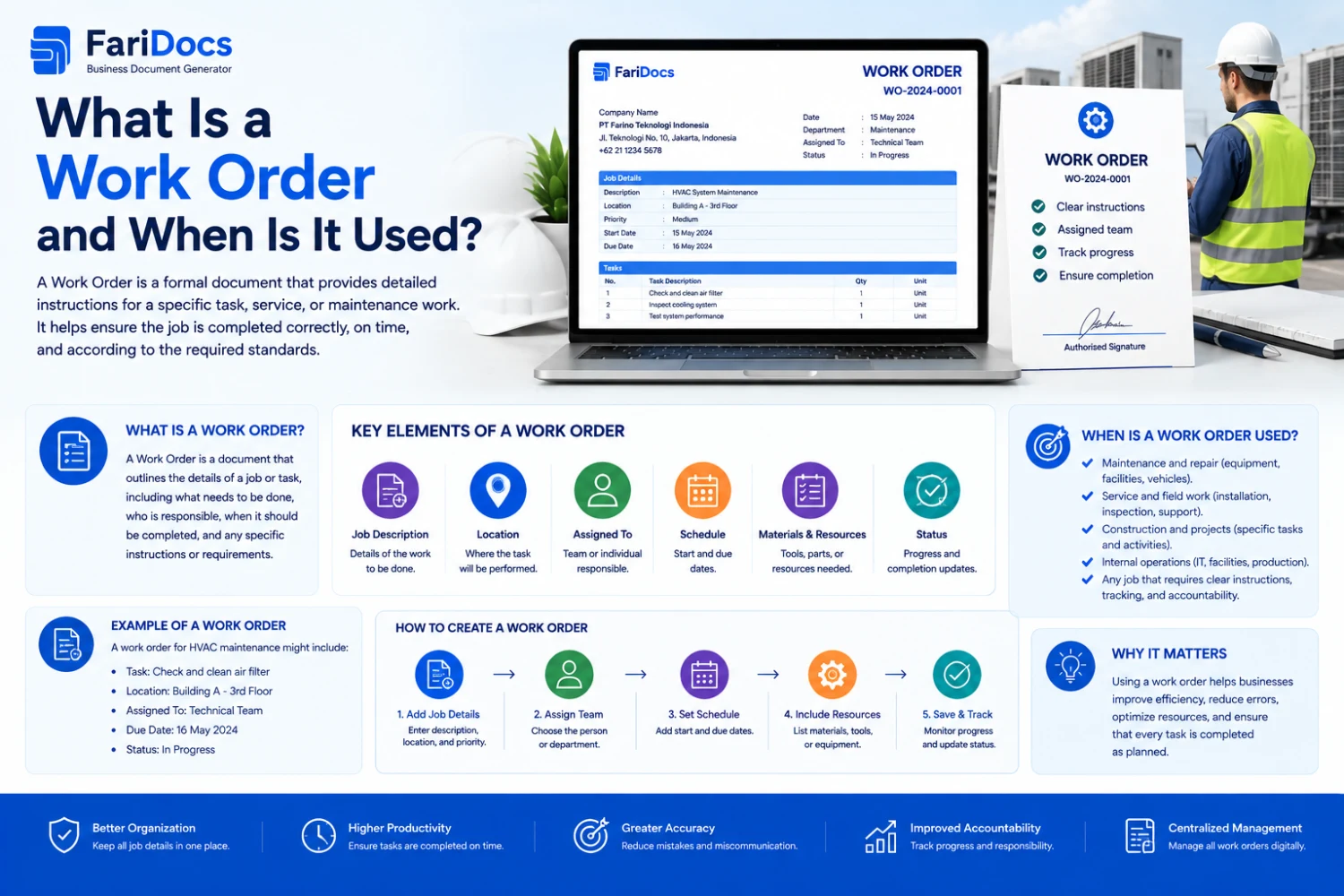
A Work Order is an important business document used to provide formal instructions for a specific job or task. Work Orders are commonly used in maintenance, construction, manufacturing, engineering, facility management, IT support, field services, and other operational activities.
A Work Order helps companies document what needs to be done, where the work will take place, who is responsible, when it should be completed, what materials are required, and the current status of the work.
In a digital business workflow such as Farinotech SaaS, a Work Order can connect work requests with assignment, material requirements, procurement, execution, and completion.
What Is a Work Order?
A Work Order is an official document or work instruction used to authorize and describe a specific task that must be performed by an employee, technician, team, contractor, or department.
A Work Order is usually created after a company receives a work request or identifies a required operational activity.
Example:
A production machine has stopped working and requires repair.
The company creates:
Work Order WO-2026-00125
Details:
- Work Type: Machine Repair
- Location: Production Area
- Equipment: CNC Machine
- Assigned Team: Maintenance Team
- Priority: High
- Due Date: August 31, 2026
- Status: In Progress
The Work Order becomes the operational reference for the assigned team.
What Is the Purpose of a Work Order?
1. Provide Work Instructions
A Work Order clearly describes the work that needs to be performed.
Example:
Work: Air Conditioner Repair
Location: Meeting Room 2
Instructions: Inspect the indoor unit, outdoor unit, refrigerant, and electrical system.
This gives technicians a clear work scope.
2. Document Work Requests
A Work Order provides a formal record that a particular task has been requested.
Example:
Employee Request → Work Order → Technician → Completed
Each task can have its own number and history.
3. Assign Responsibility
A Work Order identifies the person or team responsible for completing the task.
Examples:
- Maintenance Team
- IT Support
- Technician
- Engineering Team
- Contractor
- Project Team
4. Schedule Work
A Work Order can include:
- Start Date
- Scheduled Date
- Due Date
- Completion Date
This helps teams manage work schedules.
5. Manage Materials and Spare Parts
A Work Order can identify required:
- Spare parts
- Tools
- Materials
- Consumables
Example:
Work Order: AC Maintenance
Required materials:
- Refrigerant
- Filter
- Capacitor
6. Track Work Status
A digital Work Order can provide status tracking.
Example:
Draft
→
Submitted
→
Approved
→
Assigned
→
In Progress
→
Completed
→
Closed
Managers can quickly identify which jobs are still in progress.
7. Track Work Costs
Work Orders can include estimated and actual costs.
Example:
ComponentCostSpare PartsIDR 500,000LaborIDR 300,000TransportationIDR 100,000TotalIDR 900,000This information can support operational analysis and budgeting.
When Is a Work Order Used?
A Work Order is used whenever a company needs to formally assign, execute, and monitor a specific job.
Common use cases include:
1. Maintenance
Work Orders are widely used for maintenance activities.
Examples:
- AC maintenance
- Machine maintenance
- Electrical maintenance
- Building maintenance
- Vehicle maintenance
- Equipment maintenance
2. Repair
When equipment or facilities break down, a Work Order can be created.
Example:
Issue → Work Order → Technician → Repair → Completed
3. Preventive Maintenance
Work Orders can also be created for scheduled preventive maintenance.
Examples:
Monthly AC Maintenance
or:
Quarterly Machine Inspection
A system can generate Work Orders based on maintenance schedules.
4. Project Work
Work Orders can divide a project into smaller, manageable activities.
Example:
Office Renovation Project
Work Orders:
- WO-001 — Electrical Installation
- WO-002 — Flooring Installation
- WO-003 — Painting
- WO-004 — Air Conditioning Installation
5. Construction
Construction companies can use Work Orders to assign specific scopes of work to contractors or internal teams.
Example:
Work Order: Concrete Work
Details:
- Project
- Location
- Scope
- Quantity
- Specification
- Contractor
- Schedule
- Deadline
6. IT Support
Work Orders can be used for technical IT activities.
Examples:
- Server installation
- Network configuration
- Computer repair
- Hardware replacement
- Software deployment
- Infrastructure maintenance
7. Facility Management
Facility teams can use Work Orders to manage maintenance requests.
Example:
A meeting room light is not working.
Workflow:
Facility Request
↓
Work Order
↓
Technician
↓
Repair
↓
Completed
8. Service Businesses
Service companies can use Work Orders to manage customer service activities.
Example:
Customer Service Request
↓
Work Order
↓
Technician Assignment
↓
Service Execution
↓
Service Completed
Work Order Workflow
A typical Work Order workflow may look like:
Work Request ↓ Work Order ↓ Approval ↓ Assignment ↓ Schedule ↓ Work in Progress ↓ Inspection ↓ Completed ↓ ClosedIf the job requires purchasing materials, the workflow can be extended:
Work Request ↓ Work Order ↓ Material Request ↓ Purchase Request ↓ Purchase Order ↓ Material Received ↓ Work Execution ↓ CompletedWork Order Example
Suppose a production machine has stopped working.
Work Request
Machine Not Working
Work Order
WO-2026-00150
Details
Equipment: CNC Machine
Location: Production Area
Priority: High
Assigned To: Maintenance Team
Problem:
The machine cannot start.
Required Action:
Inspect the electrical system and replace the damaged component.
Target Date:
August 31, 2026
Status:
In Progress
After the work is completed, the technician can record:
- Work performed
- Spare parts used
- Labor hours
- Notes
- Completion date
- Supporting documents
The status can then be changed to:
Completed
Work Order Example for Maintenance
FieldExampleWO NumberWO-2026-00125Work TypePreventive MaintenanceEquipmentAir ConditionerLocationMeeting RoomPriorityMediumAssigned ToMaintenance TeamScheduled DateAug 31, 2026Due DateAug 31, 2026StatusIn ProgressEstimated CostIDR 750,000Work Order Components
A good Work Order usually contains several key pieces of information.
Work Order Number
A unique identifier for the job.
Example:
WO-2026-00125
Work Type
Examples:
- Maintenance
- Repair
- Installation
- Inspection
- Service
Description
A detailed explanation of the work.
Location
Where the work will take place.
Asset / Equipment
The equipment or asset related to the job.
Assigned To
The technician, employee, department, or contractor responsible for the work.
Priority
Examples:
- Low
- Medium
- High
- Critical
Schedule
Scheduled and due dates.
Materials
Required materials or spare parts.
Estimated Cost
Expected cost of the work.
Actual Cost
Actual cost incurred.
Status
Current work status.
Completion Notes
Information recorded after the job is completed.
Work Order vs Work Request
Work Request and Work Order are related but different.
A Work Request is a request to perform a job.
A Work Order is the formal instruction to execute that job.
Example:
Employee
↓
"AC is not working"
↓
Work Request
↓
Approval
↓
Work Order
↓
Maintenance Team
↓
Repair
↓
Completed
In simple terms:
Work Request = request for work
Work Order = instruction to perform the work
Work Order vs Purchase Order
Work Orders and Purchase Orders serve different purposes.
A Work Order focuses on work or operational activities.
A Purchase Order (PO) focuses on purchasing goods or services from a supplier.
Work OrderPurchase OrderWork instructionPurchasing documentFocuses on workFocuses on purchasingAssigned to technician/teamSent to supplierContains work scopeContains ordered items/servicesTracks workTracks procurementMay record labor/materialsRecords purchased goods/servicesExample:
Work Order:
Repair Air Conditioner
↓
Required spare part
↓
Purchase Request
↓
Purchase Order
↓
Supplier delivers spare part
↓
Technician performs repair
Work Order vs Sales Order
A Sales Order records a customer's order.
A Work Order instructs a team to perform work.
Example:
Customer Order
↓
Sales Order
↓
Service Requirement
↓
Work Order
↓
Technician
↓
Service Completed
Work Order vs Service Order
In some industries, Service Order and Work Order may have similar meanings.
Generally:
- Service Order emphasizes the requested service.
- Work Order emphasizes the actual work instruction and execution.
The terminology may vary between industries and software platforms.
Work Order and Procurement
A Work Order can be directly connected to procurement when a job requires materials or spare parts.
Example:
Work Order
Machine Repair
↓
Required Material:
Bearing
↓
Purchase Request
↓
Approval
↓
Purchase Order
↓
Supplier
↓
Delivery
↓
Technician
↓
Work Completed
This workflow allows companies to identify which Work Order a purchased material is intended for.
Work Order and BOQ
For construction and engineering projects, Work Orders can also be connected to a BOQ (Bill of Quantities).
Example:
Project
Office Renovation
↓
BOQ
Electrical Cable — 5,000 meters
↓
Work Order
Electrical Installation
↓
Material
Cable — 1,000 meters
↓
Work Completed
Connecting BOQ and Work Orders can improve visibility over both project requirements and actual work execution.
Work Order in Farinotech SaaS
In Farinotech SaaS, Work Order can be developed as part of a broader digital operational workflow.
Example:
REQUEST ↓ WORK ORDER ↓ APPROVAL ↓ ASSIGNMENT ↓ SCHEDULE ↓ MATERIAL REQUEST ↓ PURCHASE REQUEST ↓ PURCHASE ORDER ↓ DELIVERY ↓ WORK EXECUTION ↓ COMPLETEDThis workflow connects operational work with procurement activities.
Work Order Example in Farinotech SaaS
Suppose a company's production machine has broken down.
Step 1 — Work Request
User reports:
Machine Breakdown
Step 2 — Work Order
The system creates:
WO-2026-0050
Step 3 — Assignment
The Work Order is assigned to:
Maintenance Team
Step 4 — Inspection
The technician inspects the machine.
Result:
Bearing damaged
Step 5 — Material Request
The technician requires:
Bearing — 2 pcs
Step 6 — Purchase Request
If the spare part is unavailable:
PR-2026-0080
Step 7 — Purchase Order
Procurement creates:
PO-2026-0120
Step 8 — Delivery
The supplier delivers the bearing.
Step 9 — Work Execution
The technician replaces the bearing.
Step 10 — Completion
The Work Order is updated:
Status: Completed
BOQ: Definition, Functions, Example, and How to Create One for Projects
Benefits of Digital Work Orders
Using digital Work Orders can provide several benefits.
1. Centralized Work Data
All work activities are stored in one system.
2. Better Work Tracking
Managers can monitor:
- Pending
- Assigned
- In Progress
- Completed
- Closed
3. Clear Responsibility
Every Work Order can have an assigned person or team.
4. Better Scheduling
Scheduled work can be managed in a structured workflow.
5. Better Cost Tracking
Companies can record estimated and actual costs.
6. Maintenance History
Maintenance history can be associated with specific equipment or assets.
7. Connected Procurement
Required materials can be connected to Purchase Requests and Purchase Orders.
8. Better Audit Trail
Companies can maintain a searchable history of operational activities.
How to Create a Work Order
Step 1 — Identify the Work
Determine what needs to be done.
Step 2 — Create a Work Request
Document the work request when required.
Step 3 — Define the Scope
Clearly describe what the team needs to accomplish.
Step 4 — Assign a Responsible Person
Assign the job to a technician, team, department, or contractor.
Step 5 — Set the Schedule
Add scheduled and due dates.
Step 6 — Identify Materials
Determine required materials or spare parts.
Step 7 — Set Priority
For example:
Low → Medium → High → Critical
Step 8 — Execute the Work
The assigned team performs the work.
Step 9 — Record Results
Record:
- Work performed
- Materials used
- Labor hours
- Notes
- Photos/documents when required
Step 10 — Close the Work Order
After verification:
Completed → Closed
Tips for Creating Effective Work Orders
A good Work Order should contain:
- A unique Work Order number.
- Clear work description.
- Defined scope.
- Location.
- Responsible person/team.
- Schedule.
- Priority.
- Required materials.
- Estimated cost.
- Actual cost.
- Status.
- Completion notes.
Clear Work Orders make it easier for teams to execute and monitor work.
FAQ: Work Order
What is a Work Order?
A Work Order is an official document or instruction used to assign and describe a specific job to a technician, team, contractor, or department.
When is a Work Order used?
Work Orders are used for maintenance, repairs, installations, inspections, construction, IT support, facility management, and service operations.
What is the difference between a Work Request and a Work Order?
A Work Request is a request for work, while a Work Order is the formal instruction to perform that work.
What is the difference between a Work Order and a Purchase Order?
A Work Order focuses on work activities, while a Purchase Order is used to order goods or services from a supplier.
Can Work Orders be used for maintenance?
Yes. Work Orders are commonly used to manage maintenance and repair activities.
Can Work Orders be used for preventive maintenance?
Yes. Work Orders can be generated from preventive maintenance schedules, such as monthly, quarterly, or annual maintenance.
Can a Work Order be connected to a Purchase Request?
Yes. If a job requires materials or spare parts, the Work Order can become a source for creating a Purchase Request.
Can Work Orders be used in projects?
Yes. Work Orders can divide project scopes into specific activities that can be assigned and tracked.
Can Work Orders be managed digitally?
Yes. Work Orders can be managed using ERP systems, CMMS platforms, Field Service Management software, workflow software, or SaaS applications.
What information should a Work Order contain?
A Work Order typically contains the Work Order number, work type, description, location, asset, assigned person, schedule, priority, materials, costs, status, and completion notes.
Conclusion
A Work Order is an important document for formally assigning, managing, and tracking operational work.
It can be used for:
- Maintenance.
- Repairs.
- Installation.
- Inspection.
- Construction.
- IT support.
- Facility management.
- Service operations.
- Project work.
In a digital workflow, a Work Order can connect:
Work Request → Work Order → Assignment → Material Request → Purchase Request → Purchase Order → Delivery → Work Execution → Completed
For projects, Work Orders can also be connected to BOQ, while material requirements can be connected to a Procurement Management System.
By managing Work Orders digitally through Farinotech SaaS, businesses can improve work visibility, clarify responsibilities, monitor job status, manage materials, and connect operational activities with procurement workflows.