

Privacy by designPDF files are not stored
Business document generator
Create Invoice Documents in Seconds
Create professional invoices online with FariDocs. Free, unlimited and instantly downloadable PDF
✓ No credit card✓ No app installation✓ PDF format

✓Actual PDF output
PDFReady to download
Privacy-first PDF
Instant workspaceEvery change updates live
Complete workflowSales through operations
Unlimited accessNo account or credit card
THREE ESSENTIAL GENERATORS
Start with the documents businesses use most
Create an invoice, quotation, or purchase order in a focused workspace built for each business process.
Invoice
Create official invoices with payment totals and balance due.
- Automatic invoice number
- Paid & balance calculation
- Tax, discount & shipping
Quotation
Send clear, professional offers to prospective customers.
- Automatic quotation number
- Offer validity & payment terms
- Professional offer PDF
Purchase Order
Prepare accurate purchase orders for vendors and procurement.
- Automatic PO number
- Vendor & shipping details
- Tax, discount & shipping
DESIGNED FOR FAST WORK
Enter data once. Accurate totals. Instant PDF.
No manual tables or design software. FariDocs keeps every document consistent.
Automatic calculations
Subtotal, tax, discounts, shipping, total, and balance due.
Company identity
Logo, accent color, editable title, and 8 font options.
Global currencies
Rupiah and more than 90 international currencies.
Document SummaryREAL-TIME
SubtotalRp 10.000.000
Discount 5%− Rp 500.000
Tax 11%Rp 1.045.000
ShippingRp 150.000
TotalRp 10.695.000
Balance dueRp 10.695.000
FARIDOCS IN DAILY OPERATIONS
Growing with every organization we support
Documents generated
Organizations use FariDocs for daily operations
Registered companies
Trust FariDocs for business transformation
Registered users
Choose FariDocs for more efficient work
Industries
Supported with centralized business-document processes
FROM DATA TO PDF
A focused workspace for documents that must look right
Every field, calculation, visual choice, and signature remains connected to a live document preview before download.
✓ Live preview✓ Smart-fit layout✓ Privacy-first PDF
FariDocs WorkspaceLIVE DOCUMENT ENGINE
Enter business dataIdentity, recipient, and line items
Review instantlyCalculations and layout update live
Download PDFA4 file ready to send
SubtotalRp 10.000.000
Tax 11%Rp 1.100.000
TotalRp 11.100.000
NO SETUP REQUIREDYour next professional document is only a few fields away.
Create a Free Document →PRIVACY MODE
Built for trust, not data collection.
“Your PDFs are generated securely on demand and are not stored on our servers.”
Privacy FirstDOCUMENT PRIVACY STANDARD
- ✓PDF generated only when requested
- ✓No PDF file storage
- ✓No unnecessary document retention
PROFESSIONAL RESULTS
Look credible in every document
A clean layout for small businesses, private companies, distributors, and retailers.
PDFGenerated by the FariDocs document engine
What you preview is what you download.
This is a rendered page from a real PDF created by the same engine used in every generator. Logos, long line items, calculations, taxes, totals, and signatures are fitted into the selected paper size.
BEYOND A BASIC GENERATOR
Small details that make a big difference
Features designed for real sales, billing, and procurement workflows—not only a blank invoice form.
SmartFit layout engine
Long descriptions, addresses, logos, and signatures are resized and wrapped automatically.
Indonesia-ready by default
Rupiah, Indonesian date presentation, tax controls, and Bahasa Indonesia are ready from the start.
One design system, twenty documents
Twenty professional documents share one consistent visual identity.
Privacy by design
PDF files are generated only when requested and are not stored as downloadable files on the server.
True bilingual workflow
Forms, validation, guides, previews, and PDF labels are available in Indonesian and English.
Signature-ready documents
Upload a proportionally fitted signature with company or responsible-person details.
FOR EVERY ORGANIZATION
Simple to start, professional as you grow
SMEs & Freelancers
Create polished invoices and quotations without complex software.
Private Companies
Standardize sales and purchasing documents across teams.
Distributors & Retailers
Organize sales documents, commercial stock records, and customer collections.
BEFORE → AFTER
A clearer document process for every organization
See the document itself change—from a hard-to-review manual sheet into a consistent, ready-to-send FariDocs invoice.
01UMKM
BEFORE FARIDOCSinvoice_final_v3XLS
Manual files and inconsistent layouts
WITH FARIDOCSFD FariDocsINVOICE
A branded PDF ready in minutes
DESCRIPTIONQTYTOTALBusiness service1Rp 8.400.000
Invoice, quotation, and payment receipt stay clear without design software.
Illustrative scenarios—not claimed customer testimonials.
What would you like to do?
Choose a business activity. Create your document, then manage the next steps in Workspace.
Offer a product or service
Quotation → Sales Order → Invoice
Open generatorBill your client
Invoice → reminder → verified payment
Open generatorPurchase from a supplier
Purchase Order → receipt → supplier bill
Open generatorDeliver goods
Delivery note → delivery confirmation
Open generatorPartner data, linked documents and payment review stay in your company Workspace. Generating a PDF alone does not confirm delivery or payment.
See an example workflow (demo)
CV Sample Nusantara bills Rp1,000,000 for a service. These examples are not saved to transactions or reports.
- Prepare DEMO-INV-001, review client details, then issue the invoice.
- Share the secure Portal link. If unpaid after the due date, follow up from My tasks.
- The client uploads transfer proof. Finance checks it and reconciles the payment.
- Select the bank account and reviewed COA. Connect the payment and inspect its Finance transaction and journal.
SEE BEFORE YOU START
Real examples. Clear next steps.
Open sample PDFs without registering, then choose the workflow you need.
Invoice
Client → invoice → reminder → reviewed payment
Quotation
Quotation → client approval → sales order
Purchase Order
Supplier → PO → receipt → supplier bill
Samples use illustrative data, not customer transactions. Payments, approvals and goods receipts are reviewed in Workspace.
PT Farino Teknologi Indonesia
FariDocs helps prepare business documents and manage follow-up in one company Workspace.
GMI Building, Jl. Srengseng Sawah No.4, RT.2/RW.7, Srengseng Sawah, Jagakarsa, South Jakarta, DKI Jakarta 12630
About the company →Choose how to start
Public generators: create and download PDFs. Workspace: save to your account to connect documents, partners and follow-up.
FREQUENTLY ASKED QUESTIONS
Everything you need before creating a document
Still unsure which document to use?
Open the Guide for examples, document selection tips, and a final checklist.
Guide →Is FariDocs really free?+
Yes. PDF downloads are unlimited under the current service setting.
Can I send the result immediately?+
Yes. You receive a standard A4 PDF ready for email, WhatsApp, printing, or internal systems.
Are my PDF files stored?+
No. PDFs are generated on demand and are not stored as downloadable files on the server.
Can I use my own logo and signature?+
Yes. Upload JPG, JPEG, PNG, or WebP files up to 2 MB and 25 megapixels; they are validated, re-encoded, and fitted proportionally.
What happens when an item description is long?+
SmartFit automatically wraps it and continues items on a new PDF page when needed.
Can the document title and number be changed?+
Yes. Both can be edited manually, while an automatic document number is provided for convenience.
Which currencies and fonts are available?+
You can choose from more than 90 currencies and 8 modern professional fonts.
Does the language change the generated PDF?+
Yes. Indonesian or English changes the form, validation, preview, and PDF labels without clearing the draft you have entered.
LATEST INSIGHTS
Latest Articles
Practical guides for clearer, faster, and more professional business documentation.
18 Sep 2026
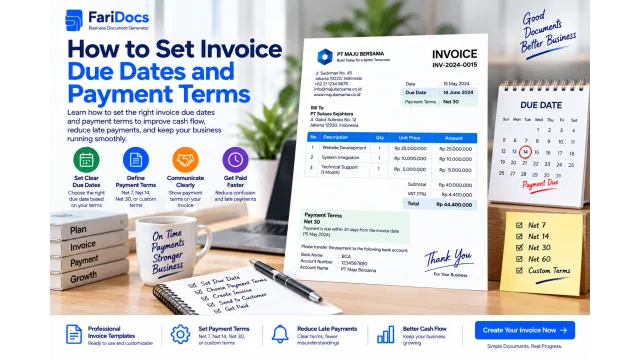
How to Set Invoice Due Dates and Payment Terms
To set an invoice due date, agree on the starting event, the payment period, and whether it uses calendar or business days. Then state the resulting date clearly on the invoice. For installments, also define the amount and billing condition for each stage.
Read article →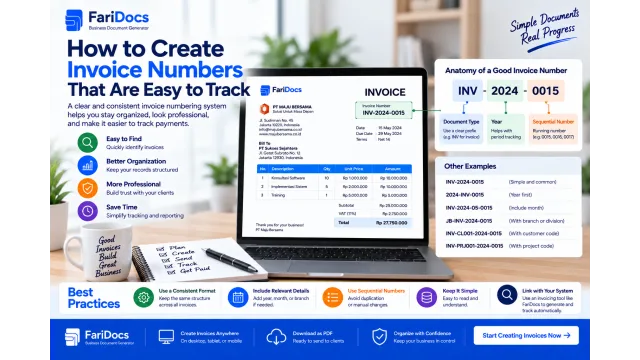
17 Sep 2026
How to Create Invoice Numbers That Are Easy to Track
To create clear invoice numbers, choose a fixed format, use a sequence, define when it resets, and record every number issued. A simple example is INV-2026-0001, combining the document prefix, year, and sequential number.
Read article →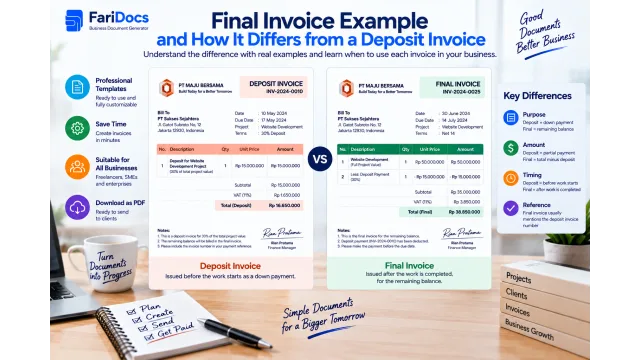
16 Sep 2026
Final Invoice Example and How It Differs from a Deposit Invoice
A final invoice requests the remaining payment for a transaction after accounting for deposits or earlier payments. A deposit invoice requests an advance payment, while a final invoice requests the outstanding balance under the agreement.
Read article →READY TO START?
Create a Free Document →Create your first business document today.
No account or credit card required.