In construction, engineering, manufacturing, interior, and other project-based businesses, companies need to understand what needs to be done, what materials are required, how much is needed, and how much the project may cost.
One of the documents commonly used to organize this information is a BOQ or Bill of Quantities.
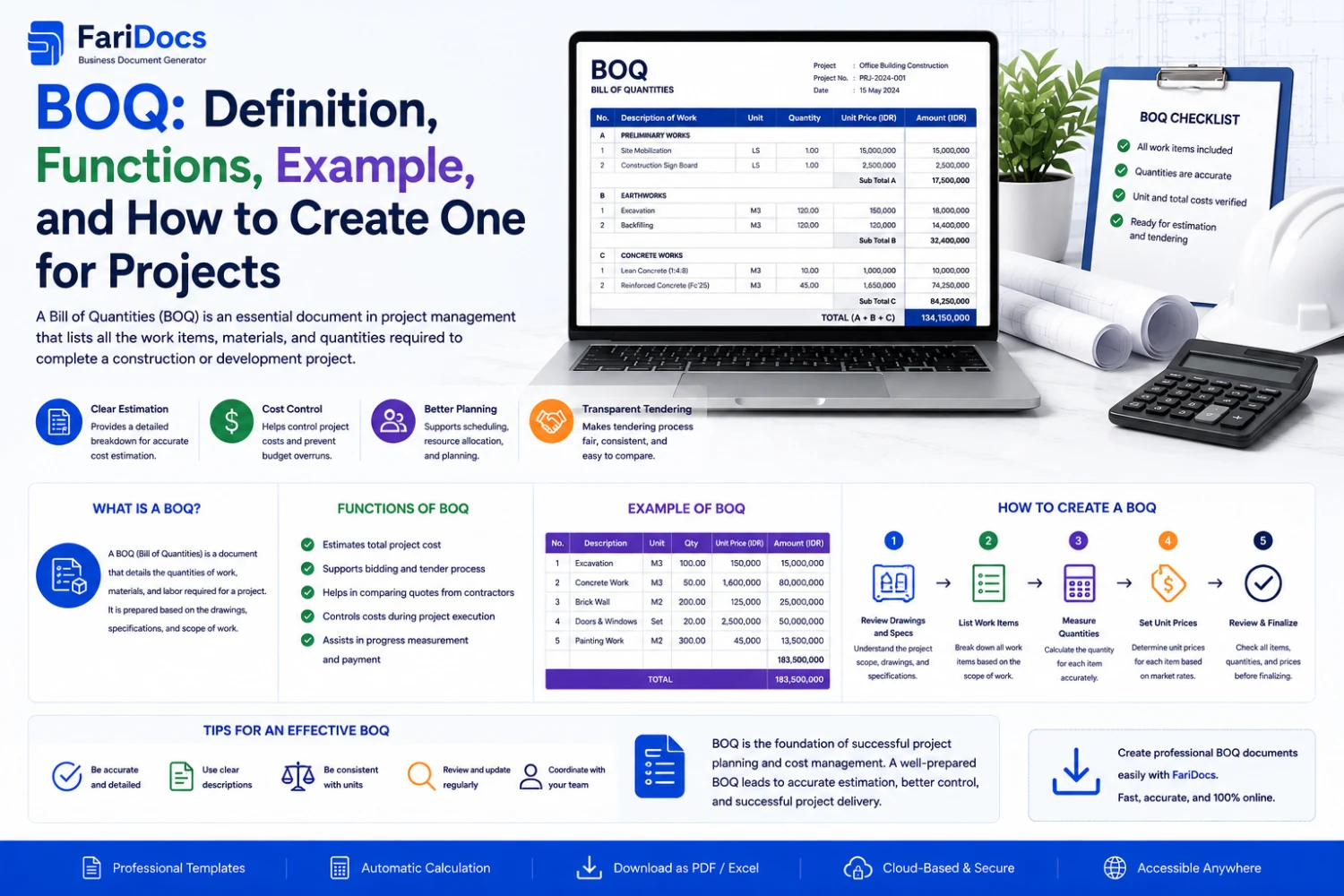
A BOQ converts project requirements into a structured list of work items or materials, including description, quantity, unit, unit price, and total amount.
In a digital business workflow, a BOQ can also become a source for creating Quotation Requests, Purchase Requests, Purchase Orders, and other procurement documents.
BOQ Definition
BOQ stands for Bill of Quantities. It is a document containing a structured list of project work items, materials, quantities, units, and cost information used for planning, tendering, estimating, procurement, and project cost control.
A typical BOQ may look like:
No.ItemUnitQuantity1CementBag5002Sandm³1003Reinforcement Steelkg5,0004Concrete Workm³250Additional columns may include:
- Unit Price.
- Total Price.
- Supplier.
- Specification.
- Work Category.
- Cost Code.
- Notes.
What Does BOQ Stand For?
BOQ stands for Bill of Quantities.
It is commonly used to describe the quantities of work, materials, or other measurable requirements within a project.
What Is the Purpose of a BOQ?
1. Identify Project Requirements
A BOQ helps identify the materials and work required to complete a project.
For example:
- Cement.
- Sand.
- Steel.
- Concrete.
- Bricks.
- Cables.
- Pipes.
- Paint.
2. Define Quantities
A BOQ provides the quantity required for each item.
Example:
2.5 mm² Cable — 5,000 meters
This information can then support procurement planning.
3. Estimate Project Costs
A BOQ can be used to calculate estimated project costs.
Basic formula:
Total = Quantity × Unit Price
Example:
500 units × IDR 100,000 = IDR 50,000,000
4. Support Procurement
BOQ items can become the basis for a Purchase Request.
Example:
BOQ requirement:
500 LED lamps
↓
Purchase Request:
500 LED lamps
5. Support Purchase Orders
After approval and supplier selection, BOQ items can be used to prepare a Purchase Order.
Workflow:
BOQ → Purchase Request → Purchase Order
6. Support Tendering and Quotations
A BOQ can be shared with suppliers or contractors as a basis for requesting pricing.
Workflow:
BOQ → Supplier → Supplier Quotation
The quotations can then be compared.
7. Support Budget Control
BOQ can help compare:
Estimated Cost vs Actual Cost
This gives project managers better visibility into project spending.
8. Monitor Project Progress
BOQ quantities can also support progress tracking.
Example:
Total Quantity: 1,000 m²
Completed: 750 m²
Progress: 75%
BOQ Components
A BOQ commonly contains:
ComponentPurposeNo.Item numberDescriptionWork/material descriptionSpecificationTechnical specificationUnitMeasurement unitQuantityRequired quantityUnit PricePrice per unitTotalTotal amountCategoryWork categoryNotesAdditional informationBOQ formats vary depending on the project.
BOQ Example for a Project
Suppose a company is working on an office renovation project.
Example:
No.DescriptionUnitQtyUnit PriceTotal1CementBag100IDR 75,000IDR 7,500,0002Sandm³20IDR 300,000IDR 6,000,0003Ceramic Tilem²500IDR 150,000IDR 75,000,0004PaintLiter200IDR 80,000IDR 16,000,0005Electrical CableMeter1,000IDR 25,000IDR 25,000,000Estimated Total: IDR 129,500,000
The figures above are illustrative and are intended to demonstrate BOQ structure.
Construction BOQ Example
For a construction project, the BOQ can be divided into work categories.
A. Preliminary Works
ItemUnitQtySite PreparationLS1MobilizationLS1Temporary FacilitiesLS1B. Structural Works
ItemUnitQtyConcretem³250Reinforcement Steelkg15,000Formworkm²2,000C. Architectural Works
ItemUnitQtyWallm²3,000Floor Tilem²1,500Paintingm²4,000Categorizing the BOQ makes project requirements easier to manage.
BOQ for Procurement
BOQ can also be used as a procurement source.
Example:
Project: Office Building
MaterialUnitQtyCementBag500SteelKg10,000CableMeter5,000PipeMeter2,000The procurement team can use this information to create Purchase Requests.
For example:
PR-001 — Cement
PR-002 — Steel
PR-003 — Electrical Cable
PR-004 — Pipe
Approved requests can then be converted into Purchase Orders.
BOQ and Procurement Management System
In a modern procurement environment, BOQ can become an important source of procurement data.
A typical workflow is:
Project ↓ BOQ ↓ Purchase Request ↓ Approval ↓ Supplier Selection ↓ Purchase Order ↓ Delivery / Goods Receipt ↓ Supplier Invoice ↓ PaymentThis connects:
Project → BOQ → Procurement → Supplier → Purchase Order → Invoice
BOQ in Farinotech SaaS
For Farinotech SaaS, BOQ can become part of a Project Procurement Management Workflow.
Example:
Project
Office Renovation Project
BOQ
Flooring — 1,000 m²
Purchase Request
PR-2026-0100
Quantity:
1,000 m²
Supplier
ABC Company
Purchase Order
PO-2026-0150
Delivery
800 m² received
Remaining
200 m²
Connecting these documents can help project and procurement teams understand the status of project requirements.
BOQ Workflow in Farinotech
Suppose a company has:
Construction Project A
Step 1 — Create Project
Construction Project A
Step 2 — Create BOQ
Item:
Concrete
Quantity:
500 m³
Step 3 — Create Purchase Request
PR-2026-0001
Quantity:
500 m³
Step 4 — Approval
Status:
Pending Approval
Then:
Approved
Step 5 — Supplier Selection
The procurement team evaluates:
- Price.
- Quality.
- Lead time.
- Payment terms.
- Availability.
Step 6 — Purchase Order
PO-2026-0001
Step 7 — Delivery
Supplier delivers:
300 m³
Status:
Partially Received
Step 8 — Remaining Quantity
BOQ:
500 m³
Received:
300 m³
Remaining:
200 m³
This provides clearer visibility into outstanding project requirements.
BOQ vs RAB
BOQ and RAB are sometimes treated as the same thing, but their purposes can differ.
BOQRABBill of QuantitiesProject Cost EstimateFocuses on quantities and work itemsFocuses on estimated budgetCommonly used for tender/procurementCommonly used for budgetingLists items and quantitiesCalculates estimated costsCan support quotationsSupports project cost planningIn practice, BOQ and RAB may have very similar structures and are often used together.
BOQ vs Quotation
A BOQ describes project requirements.
A Quotation provides pricing from a supplier or contractor.
Example:
BOQ:
1,000 meters of cable
↓
Supplier Quotation:
IDR 25,000/meter
Therefore:
BOQ → Request for Quotation → Supplier Quotation
BOQ vs Purchase Order
A BOQ is not a Purchase Order.
BOQ describes project requirements.
Purchase Order is a formal purchase document issued to a supplier.
Example:
BOQ:
5,000 meters cable
↓
Purchase Request:
5,000 meters cable
↓
Purchase Order:
Supplier ABC — 5,000 meters cable
BOQ vs Invoice
BOQ is generally used during planning and procurement, while an Invoice is used for billing.
Typical workflow:
BOQ
↓
Procurement
↓
Purchase Order
↓
Delivery
↓
Invoice
Digital systems can reuse relevant BOQ information to reduce repetitive data entry.
Benefits of Digital BOQ
Managing BOQ digitally can provide several benefits.
Centralized Data
Project items are stored in one system.
Faster Procurement
BOQ items can become the basis for Purchase Requests.
Better Tracking
Companies can compare required, ordered, and received quantities.
Budget Monitoring
Estimated costs can be compared with actual purchasing costs.
Reduced Manual Entry
Data does not have to be recreated repeatedly.
Better Project Visibility
Project managers can see project requirements in a structured format.
How to Create a BOQ
Step 1 — Define Project Scope
Identify the work and requirements included in the project.
Step 2 — Create Work Breakdown
Group work into categories such as:
- Civil.
- Structural.
- Architecture.
- Electrical.
- Mechanical.
Step 3 — Identify Materials and Work Items
Create a complete list of project requirements.
Step 4 — Define Units
Examples:
- pcs
- unit
- kg
- meter
- m²
- m³
- lot
Step 5 — Define Quantities
Calculate the required quantity for each item.
Step 6 — Add Pricing
Add estimated unit prices when needed.
Step 7 — Calculate Totals
Quantity × Unit Price = Total
Step 8 — Review the BOQ
Make sure the items and quantities match the project scope.
Step 9 — Connect BOQ to Procurement
Items requiring purchasing can be used to create Purchase Requests.
Tips for Creating a Better BOQ
A good BOQ should have:
- Clear item descriptions.
- Consistent units.
- Realistic quantities.
- Complete specifications.
- Clear categories.
- No duplicate items.
- Reliable pricing sources.
- Documented revisions.
- Version control when required.
FAQ: BOQ
What is a BOQ?
BOQ stands for Bill of Quantities, a document listing project work items or materials along with quantities and cost information.
What is the purpose of a BOQ?
BOQ supports project planning, cost estimation, tendering, procurement, budgeting, and project monitoring.
What does BOQ stand for?
BOQ stands for Bill of Quantities.
Is BOQ the same as RAB?
Not necessarily. BOQ focuses primarily on items and quantities, while RAB focuses more on project budget estimates.
Is BOQ used in procurement?
Yes. BOQ can be used as a basis for Purchase Requests and Purchase Orders.
Who prepares a BOQ?
Depending on the project, it may be prepared by a quantity surveyor, estimator, engineer, contractor, consultant, project manager, or other project team members.
Is BOQ only used in construction?
No. BOQ can also be used for engineering, interior projects, maintenance, manufacturing, IT infrastructure, and other measurable projects.
Can BOQ be managed digitally?
Yes. BOQs can be managed through spreadsheets, project management software, procurement platforms, ERP systems, or SaaS applications.
How is BOQ related to a Purchase Request?
Items requiring procurement can be taken from the BOQ and used as the basis for a Purchase Request.
How is BOQ related to a Purchase Order?
After the Purchase Request is approved and the supplier is selected, BOQ items can support the creation of a Purchase Order.
Conclusion
A BOQ (Bill of Quantities) is an important project document for organizing work items, materials, quantities, and cost information.
It helps businesses understand:
- What is required.
- How much is required.
- Estimated project costs.
- What needs to be purchased.
- How much has been ordered.
- How much has been received.
In a digital workflow, BOQ can connect:
Project → BOQ → Purchase Request → Approval → Supplier → Purchase Order → Delivery → Invoice → Payment
By integrating BOQ into Farinotech SaaS, businesses can build a more structured project procurement workflow and improve visibility from project planning through purchasing and delivery.