A controlled purchasing process is essential for businesses that want to manage spending, budgets, suppliers, and procurement activities effectively.
One of the key documents used in procurement is the Purchase Request (PR).
A Purchase Request allows employees or departments to formally request goods or services before procurement takes place.
However, simply creating a PR is not enough.
Companies need a structured Purchase Request Approval Workflow to determine who reviews, approves, rejects, or returns a purchase request before it moves to the next procurement stage.
A well-designed approval workflow improves:
- Spending control
- Accountability
- Transparency
- Procurement visibility
- Approval speed
- Auditability
With a SaaS procurement platform such as Farinotech.id, businesses can digitize Purchase Request approval instead of relying on paper forms, spreadsheets, emails, or informal communication.
What Is a Purchase Request Approval Workflow?
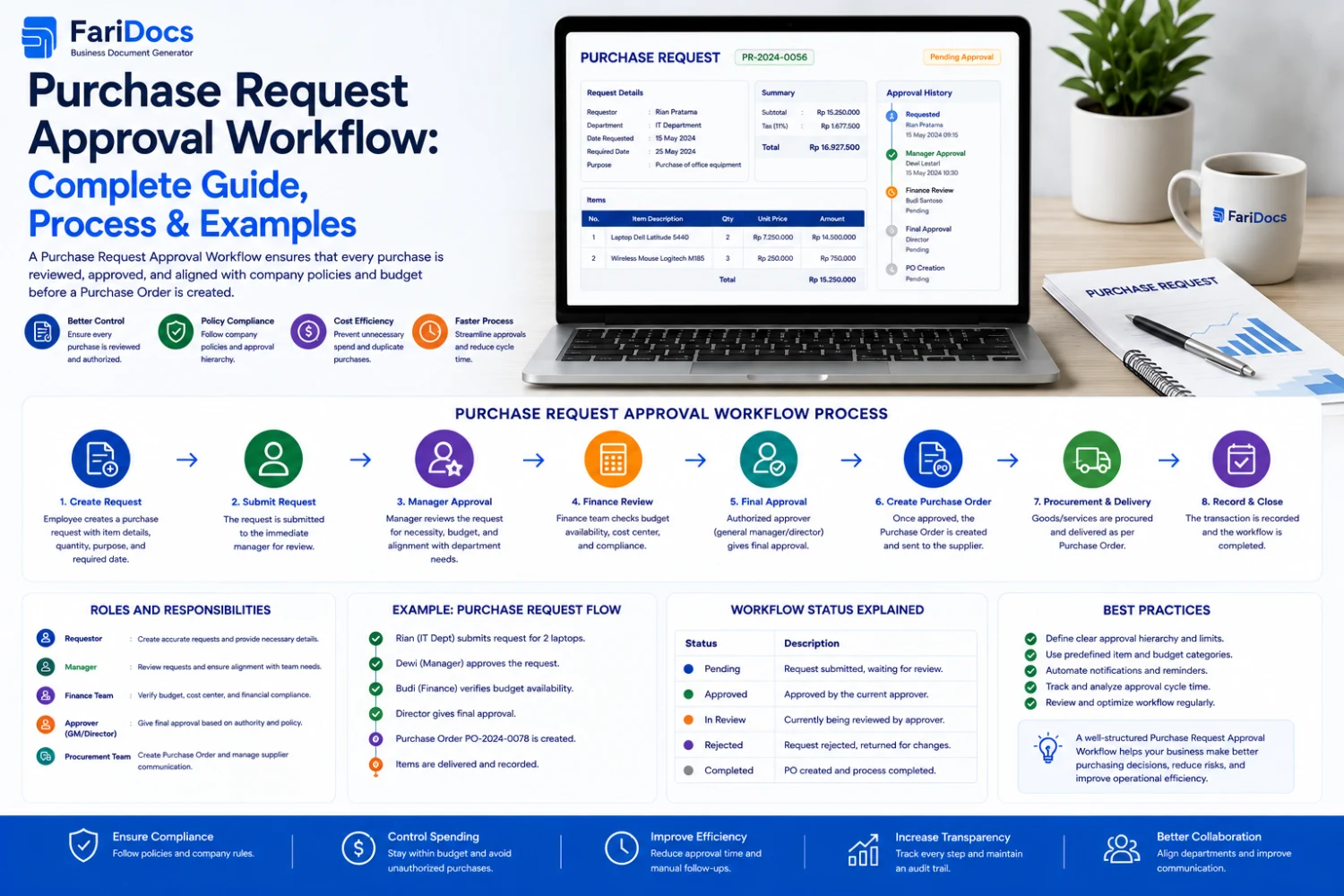
A Purchase Request Approval Workflow is a structured process used to review and approve a Purchase Request before the requested purchase proceeds to procurement.
A simple workflow looks like:
Request → Review → Approval → Procurement → Purchase Order
More complex organizations may have multiple approval levels:
Employee → Department Manager → Finance → Procurement Manager → Management
Approval rules can be based on:
- Purchase amount
- Department
- Product category
- Project
- Cost center
- Budget
- Supplier
- Urgency
- Approval authority
What Is a Purchase Request?
A Purchase Request is an internal document used to request the purchase of goods or services.
Examples include:
- Laptops
- Software
- Office supplies
- Spare parts
- Raw materials
- Construction materials
- Equipment
- Professional services
- Maintenance services
A Purchase Request does not necessarily mean that a purchase has already been made.
It is an internal request that must usually be reviewed and approved before procurement proceeds.
Purchase Request vs Purchase Order
Purchase RequestPurchase OrderInternal purchase requestSupplier purchasing documentUsually created by requesterUsually created by procurementRequires internal approvalSent to supplierDoes not represent a supplier orderRepresents an official orderUsed to request a purchaseUsed to purchase goods/servicesExample:
An employee needs 10 laptops.
The workflow starts with:
Purchase Request → Approval
After approval:
Supplier Selection → Purchase Order → Supplier
This distinction is important when designing a procurement workflow.
Why Is Purchase Request Approval Important?
1. Spending Control
Approval ensures purchases are reviewed before money is committed.
Management can verify:
- Business necessity
- Budget availability
- Purchase justification
- Company policy
2. Prevent Unauthorized Purchasing
A formal workflow prevents employees from purchasing goods without appropriate authorization.
3. Improve Accountability
Each stage has a responsible person.
Example:
Requester → Manager → Finance → Procurement
This makes responsibility easier to track.
4. Speed Up Procurement
Digital workflows allow approvers to review pending requests without relying on paper documents.
5. Improve Visibility
Requesters and management can see statuses such as:
Draft → Submitted → Pending Approval → Approved → In Procurement → Completed
Ideal Purchase Request Approval Workflow
Step 1 — Create Purchase Request
The requester creates a PR.
Typical information includes:
- Item
- Quantity
- Estimated price
- Required date
- Department
- Project
- Reason
- Attachments
Step 2 — Submit the Purchase Request
After completing the information, the requester submits the PR.
Status:
Submitted
The system then routes it to the appropriate approver.
Step 3 — Department Approval
The department manager reviews:
- Business necessity
- Quantity
- Specification
- Department requirements
- Budget
The manager can:
Approve / Reject / Return
Step 4 — Finance Review
Finance may review:
- Available budget
- Cost center
- Project budget
- Estimated spending
- Financial policy
Step 5 — Procurement Review
Procurement reviews:
- Specifications
- Quantity
- Supplier options
- Estimated price
- Existing contracts
- Supplier availability
The procurement team can then begin sourcing.
Step 6 — Supplier Quotation
Procurement may request quotations from suppliers.
Workflow:
Purchase Request → Supplier Quotation → Evaluation → Supplier Selection
Step 7 — Create Purchase Order
Once a supplier is selected:
Approved PR → Purchase Order → Supplier
Step 8 — Delivery
The supplier delivers the requested goods or services.
The company may record the receipt through a Delivery Note or Goods Receipt process.
Step 9 — Invoice
The supplier submits an invoice after delivery or according to the agreed billing terms.
Step 10 — Payment
Finance verifies the relevant documents and processes payment.
Purchase Request Approval Workflow Example
A simple example:
Employee
↓
Create Purchase Request
↓
Submit PR
↓
Department Manager
↓
Finance Approval
↓
Procurement Review
↓
Supplier Quotation
↓
Purchase Order
↓
Delivery
↓
Invoice
↓
Payment
The workflow should be adapted to the company's internal policies and organizational structure.
Approval Matrix Based on Purchase Amount
Organizations can establish different approval levels based on spending thresholds.
Example:
Purchase AmountApproval< IDR 5 millionDepartment ManagerIDR 5–50 millionDepartment Manager + FinanceIDR 50–250 millionManager + Finance + Procurement Manager> IDR 250 millionManagement / DirectorThese values are examples only. Each company should establish its own approval matrix.
Department-Based Approval Workflow
Different departments may have different approval structures.
IT
Requester → IT Manager → Finance → Procurement
Marketing
Requester → Marketing Manager → Finance → Procurement
Engineering
Engineer → Project Manager → Procurement → Finance
Department-based routing ensures that requests are reviewed by the right people.
Project-Based Purchase Request Approval
Project-based businesses can associate Purchase Requests with specific projects.
For example:
Project A
PR → Project Manager → Finance → Procurement
Project B
PR → Project Manager → Finance → Procurement
This makes it easier to track project-related purchasing.
Budget-Based Approval
Budget control is another important part of procurement approval.
Example:
Requested Amount: IDR 100,000,000
Available Budget: IDR 80,000,000
The system can flag the request for further review.
Possible actions include:
- Adjust the requested amount
- Request additional budget
- Reject the request
- Escalate to management
Common Purchase Request Statuses
Draft
The PR is still being prepared.
Submitted
The PR has been submitted for approval.
Pending Approval
The PR is waiting for an approver.
Approved
The request has been approved.
Rejected
The request has been rejected.
Returned
The request has been sent back for revision.
In Procurement
Procurement is processing the request.
Converted to PO
The approved PR has been converted or used as the basis for a Purchase Order.
Completed
The purchasing process has been completed.
What Happens When a Purchase Request Is Rejected?
When a PR is rejected, the system should ideally record:
- Approver
- Approval date
- Status
- Rejection reason
- Comments
Example:
Status: Rejected
Reason: Department budget is not available for the current period.
This information is valuable for accountability and audit purposes.
What Happens When a Purchase Request Is Returned?
A PR does not always need to be rejected.
The approver may select:
Return for Revision
Example:
The laptop specification is incomplete. Please add processor, RAM, storage, and operating system requirements.
The requester can then update the PR and resubmit it.
Approval Delegation
Approvers may not always be available.
For example, they may be:
- On vacation
- Traveling
- Attending meetings
- Working remotely
- Temporarily unavailable
Organizations can implement approval delegation according to their internal policies.
Example:
Manager A → Delegate → Manager B
Manager B can handle assigned approvals during the defined delegation period.
Approval SLA
Companies can also define an approval SLA.
Example:
Department Manager: 1 business day
Finance: 1 business day
Procurement: 2 business days
Automated reminders can be used when an approval approaches or exceeds its SLA.
Automated Purchase Request Notifications
A digital procurement system can notify users when:
- A new PR requires approval
- A PR is approved
- A PR is rejected
- A PR is returned
- An approval is overdue
- A PR is converted into a PO
This reduces dependency on manual follow-ups.
Purchase Request Approval Audit Trail
An audit trail records the history of a Purchase Request.
Example:
DateUserActionStatusSep 2User ACreatedDraftSep 2User ASubmittedPending ApprovalSep 2Manager AApprovedApprovedSep 3FinanceApprovedApprovedSep 3ProcurementConvertedPOAn audit trail improves accountability and makes procurement records easier to review.
Purchase Request Approval Workflow with Farinotech SaaS
A SaaS procurement workflow can connect the entire purchasing process.
Example:
Requester
↓
Purchase Request
↓
Approval Workflow
↓
Department Approval
↓
Finance Approval
↓
Procurement
↓
Quotation
↓
Purchase Order
↓
Delivery
↓
Invoice
↓
Payment
With an integrated workflow, data from an approved PR can be reused in subsequent procurement documents.
Benefits of Digital Purchase Request Approval
Reduce Paperwork
Purchase Requests can be created and processed digitally.
Faster Approval
Approvers can see pending requests in one place.
Reduce Manual Data Entry
Approved PR information can flow into subsequent procurement processes.
Better Visibility
Management can monitor:
- Pending PRs
- Approved PRs
- Rejected PRs
- PRs in procurement
- Completed PRs
Easier Auditing
Approval history can be recorded systematically.
Purchase Request Approval Best Practices
1. Define an Approval Matrix
Define approval rules based on:
- Purchase amount
- Department
- Project
- Cost center
- Category
2. Avoid Unnecessary Approval Levels
Too many approval levels can create procurement bottlenecks.
Use only the approval stages required by company policy.
3. Define Approval SLAs
Set a clear response time for each approver.
4. Enable Notifications
Approvers should be notified when action is required.
5. Maintain an Audit Trail
All approval actions and significant changes should be recorded.
6. Use Role-Based Access
Different users should have different permissions.
Example:
Requester: Create PR
Manager: Approve PR
Finance: Budget Review
Procurement: Process PR
Director: High-Value Approval
7. Connect PR with Purchase Order
Approved Purchase Requests should be usable as the foundation for Purchase Orders to reduce duplicate data entry.
Common Purchase Request Approval Mistakes
Approvals Only Through Chat
Informal chat approvals can be difficult to track and audit.
No Approval Matrix
Without defined rules, approvals may become inconsistent.
No SLA
Requests may remain pending for too long.
No Rejection Reason
Requesters may not understand why their requests were rejected.
No Data Integration
Users may have to enter the same information multiple times.
No Audit Trail
Companies may struggle to determine who approved or changed a request.
FAQ: Purchase Request Approval Workflow
What is a Purchase Request Approval Workflow?
It is the process used to review and approve a Purchase Request before procurement proceeds.
Who approves a Purchase Request?
Depending on company policy, approval may involve a Department Manager, Finance, Procurement Manager, Management, or Director.
Is a Purchase Request the same as a Purchase Order?
No. A Purchase Request is an internal purchase request, while a Purchase Order is an official purchasing document sent to a supplier.
Why does a Purchase Request need approval?
Approval helps ensure that purchases are necessary, authorized, budgeted, and compliant with company policies.
What happens when a Purchase Request is rejected?
The PR becomes rejected and should ideally include the reason for rejection.
What is the difference between Reject and Return?
Reject means the request is not approved. Return means the request needs revision or additional information before it can be reviewed again.
Can approval be based on purchase amount?
Yes. Companies can establish approval thresholds based on purchase value.
Can Purchase Requests be linked to projects?
Yes. PRs can be associated with projects, departments, cost centers, or budgets depending on the system.
Can an approved Purchase Request become a Purchase Order?
Yes. An approved PR can be used as the basis for creating a Purchase Order.
What are the benefits of digital Purchase Request approval?
Digital approval improves speed, transparency, accountability, workflow visibility, and auditability while reducing manual administration.
Conclusion
A well-designed Purchase Request Approval Workflow is an essential component of modern procurement management.
It helps organizations:
- Control spending
- Protect budgets
- Improve accountability
- Speed up approvals
- Reduce manual processes
- Improve procurement visibility
- Strengthen audit trails
- Reduce unauthorized purchasing
A complete procurement workflow can follow:
Purchase Request → Approval → Procurement → Quotation → Purchase Order → Delivery → Invoice → Payment
With Farinotech SaaS, businesses can build a more structured digital procurement workflow by connecting Purchase Requests with approval, procurement, purchasing, delivery, invoicing, and payment processes.