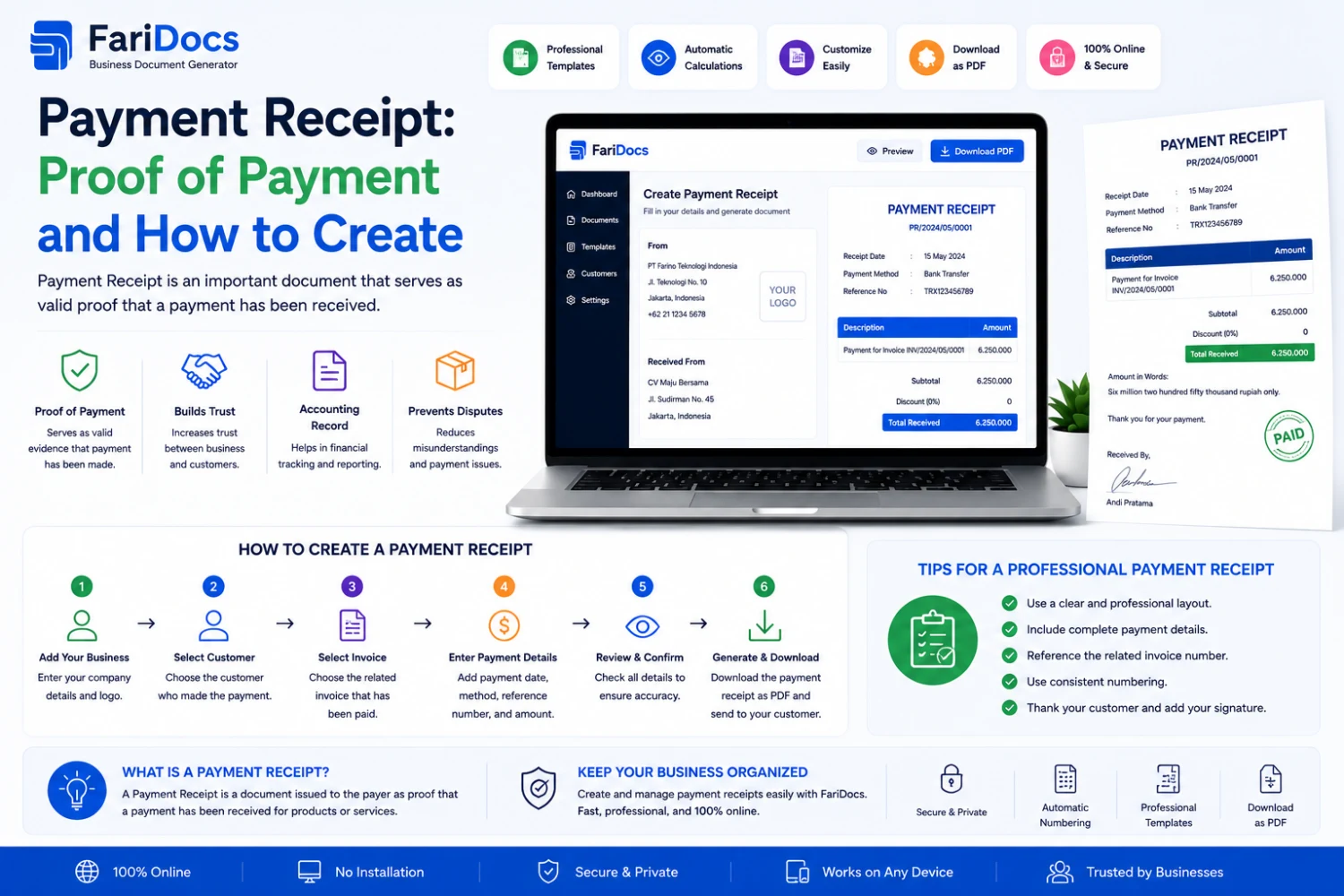
A Payment Receipt is an important document used to record and confirm payments in business transactions.
After a company issues an invoice and the customer makes a payment, the business can record the payment and provide a Payment Receipt as transaction documentation.
A common business workflow is:
Quotation → Sales Order → Delivery Note → Invoice → Payment → Payment Receipt
The exact workflow may vary depending on the company's business model and accounting procedures.
What Is a Payment Receipt?
A Payment Receipt is a document that records and provides evidence that a payment has been made or received for a business transaction.
It is commonly issued by the party receiving the payment.
A Payment Receipt may include:
- Receipt number
- Payment date
- Customer name
- Invoice number
- Payment method
- Payment amount
- Currency
- Transaction reference
- Payment status
- Notes
- Company information
Example:
Payment Receipt No.: PR-2026-00125
Customer: ABC Indonesia
Invoice: INV-2026-00125
Payment Date: August 27, 2026
Amount Paid: IDR 25,000,000
Payment Method: Bank Transfer
What Is the Purpose of a Payment Receipt?
1. Proof of Payment
The primary purpose is to document that payment has been made and received or recorded.
2. Connect Payment to an Invoice
A Payment Receipt can reference the invoice being paid.
For example:
Invoice: INV-2026-00125
Payment Receipt: PR-2026-00125
This makes it easier to identify which invoice the payment belongs to.
3. Support Payment Reconciliation
Finance teams can use payment records to compare:
Invoice → Payment → Bank Transaction
For example:
Invoice:
IDR 50,000,000
Payment:
IDR 50,000,000
Balance:
IDR 0
Status:
Paid
4. Reduce Payment Disputes
A Payment Receipt provides documentation when customers ask about payment status.
Finance can review:
- Receipt number
- Invoice number
- Payment date
- Amount
- Payment method
- Transaction reference
5. Improve Financial Administration
Payment Receipts help companies maintain an organized payment history for:
- Finance
- Accounting
- Audit
- Customers
- Management
6. Confirm Payment to Customers
A professional Payment Receipt gives customers confirmation that their payment has been received or recorded.
Payment Receipt vs Invoice
These two documents serve different purposes.
AspectInvoicePayment ReceiptPurposeRequest/payment billingProof of paymentCreated whenGoods/services are billedPayment is made/receivedFocusAmount dueAmount paidStatusUnpaid/Paid/OverdueConfirmed/RecordedMain referenceInvoice numberReceipt numberAn easy way to remember:
Invoice = "You need to pay."
Payment Receipt = "Your payment has been received/recorded."
Payment Receipt vs Receipt
A Payment Receipt is a type of receipt specifically focused on documenting a payment transaction.
Depending on the country, industry, and business process, terms such as:
- Payment Receipt
- Receipt
- Proof of Payment
- Payment Confirmation
- Payment Acknowledgment
may be used differently.
Businesses should use terminology and formats appropriate to their accounting and legal requirements.
What Should a Payment Receipt Include?
Company Information
- Company name
- Logo
- Address
- Phone
- Website
Receipt Information
- Receipt number
- Payment date
- Invoice number
- Customer reference
Customer Information
- Customer name
- Company
- Address
- Phone
Payment Details
Example:
DescriptionAmountPayment for Invoice INV-2026-00125IDR 25,000,000Total Paid: IDR 25,000,000
Payment Method
Examples:
- Bank transfer
- Cash
- Credit card
- Debit card
- Virtual account
- Payment gateway
- E-wallet
Transaction Reference
Example:
Transaction Reference: TRX-987654321
Notes
Example:
Payment received and recorded for Invoice INV-2026-00125.
Payment Receipt Example
PAYMENT RECEIPT
PT Farino Teknologi Indonesia
Receipt No.: PR-2026-00125
Payment Date: August 27, 2026
Customer
ABC Indonesia
Payment Information
DescriptionAmountPayment for Invoice INV-2026-00125IDR 25,000,000Total Paid: IDR 25,000,000
Payment Method: Bank Transfer
Transaction Reference: TRX-987654321
Invoice: INV-2026-00125
Payment Status: Paid
Notes:
Payment received and recorded successfully.
Authorized By
How to Create a Payment Receipt
Step 1 — Issue the Invoice
The company creates:
INV-2026-00125
Total:
IDR 25,000,000
Status:
Unpaid
Step 2 — Customer Makes the Payment
The customer pays using the agreed payment method.
For example:
Bank Transfer
Step 3 — Verify the Payment
Finance verifies:
- Amount
- Date
- Bank account
- Transaction reference
- Sender
- Related invoice
Step 4 — Record the Payment
After verification:
Invoice Amount: IDR 25,000,000
Paid: IDR 25,000,000
Balance: IDR 0
Step 5 — Generate the Payment Receipt
The system generates:
PR-2026-00125
The receipt can then be provided to the customer.
Step 6 — Update the Invoice
The invoice status changes from:
Unpaid
to:
Paid
For a partial payment:
Partially Paid
Payment Receipt for Partial Payments
Payment Receipts are particularly useful when customers pay an invoice in installments.
Example:
Invoice:
IDR 100,000,000
Payment:
IDR 40,000,000
Remaining:
IDR 60,000,000
The Payment Receipt records:
Paid Amount = IDR 40,000,000
Invoice status:
Partially Paid
When the remaining IDR 60,000,000 is paid, another payment transaction can be recorded.
Final status:
Paid
Multiple Payments for One Invoice
One invoice can have multiple payments.
Example:
Invoice:
IDR 100,000,000
Payment 1:
IDR 30,000,000
Payment 2:
IDR 20,000,000
Payment 3:
IDR 50,000,000
Total:
IDR 100,000,000
PaymentAmountStatusPR-001IDR 30,000,000ConfirmedPR-002IDR 20,000,000ConfirmedPR-003IDR 50,000,000ConfirmedFinal Invoice Status:
Paid
This workflow is useful for businesses that offer payment terms or installment arrangements.
Payment Receipt in Farinotech SaaS
Farinotech SaaS can be positioned around a connected business workflow:
Customer ↓ Quotation ↓ Sales Order ↓ Delivery Note ↓ Invoice ↓ Payment ↓ Payment ReceiptInvoice information can be used as a reference when recording a payment.
For example:
Invoice: INV-2026-00125
Customer: ABC Indonesia
Invoice Total: IDR 50,000,000
Customer pays:
IDR 50,000,000
The transaction becomes:
Paid = IDR 50,000,000
Balance = IDR 0
Invoice Status = Paid
Payment Receipt:
PR-2026-00125
Payment Receipt Workflow in Farinotech SaaS
1. Create Invoice
INV-2026-00125
Amount:
IDR 50,000,000
Status:
Unpaid
2. Customer Pays
Customer makes the payment.
3. Record Payment
Finance enters:
- Payment date
- Amount
- Payment method
- Transaction reference
4. Calculate Outstanding
Invoice:
IDR 50,000,000
Payment:
IDR 30,000,000
Outstanding:
IDR 20,000,000
5. Generate Payment Receipt
PR-2026-00125
6. Update Invoice Status
Partially Paid
or:
Paid
Benefits of Digital Payment Receipts
A SaaS-based payment workflow can help businesses:
Reduce Manual Data Entry
Customer and invoice information can be reused.
Reduce Errors
Payment records can be connected to the relevant invoice.
Track Payments
Finance teams can see:
- Invoice amount
- Paid amount
- Outstanding balance
- Payment history
Improve Reconciliation
Payment records can be compared with bank transactions and invoices.
Improve Customer Experience
Customers can receive payment confirmation faster.
Organize Transaction Records
Payment Receipts can be stored together with transaction history.
Payment Status
Common payment statuses include:
- Pending
- Submitted
- Confirmed
- Partially Paid
- Paid
- Failed
- Cancelled
The exact statuses should be customized according to the company's workflow.
Payment Receipt and Accounting
Payment data can support the accounting process.
Example:
Invoice
IDR 100,000,000
↓
Payment
IDR 100,000,000
↓
Payment Receipt
PR-001
↓
Invoice Status
Paid
The finance team can then use the payment information for accounting and reconciliation according to the company's accounting system.
Payment Receipts for B2B Businesses
Payment Receipts are especially useful for B2B companies because they may manage:
- Multiple customers
- Large invoice volumes
- Payment terms
- Partial payments
- Multiple payments
- Credit terms
- Outstanding balances
Example:
Customer: XYZ Indonesia
Invoice: INV-1001
Invoice Amount: IDR 250,000,000
Payment 1: IDR 100,000,000
Payment 2: IDR 100,000,000
Payment 3: IDR 50,000,000
A digital system can maintain the complete payment history under the same invoice.
FAQ
What is a Payment Receipt?
A Payment Receipt is a document used to record and provide evidence that a payment has been made or received.
What is the purpose of a Payment Receipt?
It provides payment evidence, connects payments to invoices, supports reconciliation, and maintains transaction records.
What is the difference between an Invoice and a Payment Receipt?
An Invoice requests or documents an amount due, while a Payment Receipt documents a payment that has been made or received.
Is a Payment Receipt the same as a receipt?
They can be similar depending on the business context. A Payment Receipt specifically focuses on documenting a payment transaction.
When should a Payment Receipt be created?
Usually after payment has been received or verified according to the company's payment workflow.
Should a Payment Receipt include an Invoice Number?
Yes, when the payment relates to a specific invoice. This makes transaction tracking easier.
Can one invoice have multiple Payment Receipts?
Yes. Multiple receipts can be created when an invoice is paid through partial or installment payments.
Can Payment Receipts be generated automatically?
Yes. SaaS and accounting systems can generate Payment Receipts based on recorded payment transactions.
Should a Payment Receipt include the payment method?
It is recommended because it provides additional transaction information and supports reconciliation.
Is a Payment Receipt the same as a bank transfer receipt?
Not necessarily. A bank transfer receipt generally proves that funds were transferred by the payer, while a Payment Receipt is usually issued or recorded by the receiving business as confirmation of the payment.
Conclusion
A Payment Receipt is an important document for recording and confirming business payments.
An Invoice tells the customer what needs to be paid, while a Payment Receipt documents what has been paid or received.
A common workflow is:
Quotation → Sales Order → Delivery Note → Invoice → Payment → Payment Receipt
With Farinotech SaaS, businesses can connect invoices, payments, and payment receipts into a more structured digital workflow.
This helps businesses monitor:
Invoice Amount → Paid Amount → Outstanding → Payment History → Payment Receipt
and provides Sales, Finance, Accounting, and Management with better visibility into the company's transaction lifecycle.