It provides information about the goods being delivered from a seller, supplier, warehouse, or company to a customer or recipient.
In a typical sales workflow:
Quotation = Sales Offer
Sales Order = Customer Order
Delivery Note = Delivery Documentation
Invoice = Billing
A common workflow is:
Quotation → Sales Order → Delivery Note → Invoice → Payment
The exact workflow may vary depending on the company's business model and billing policy.
What Is a Delivery Note?
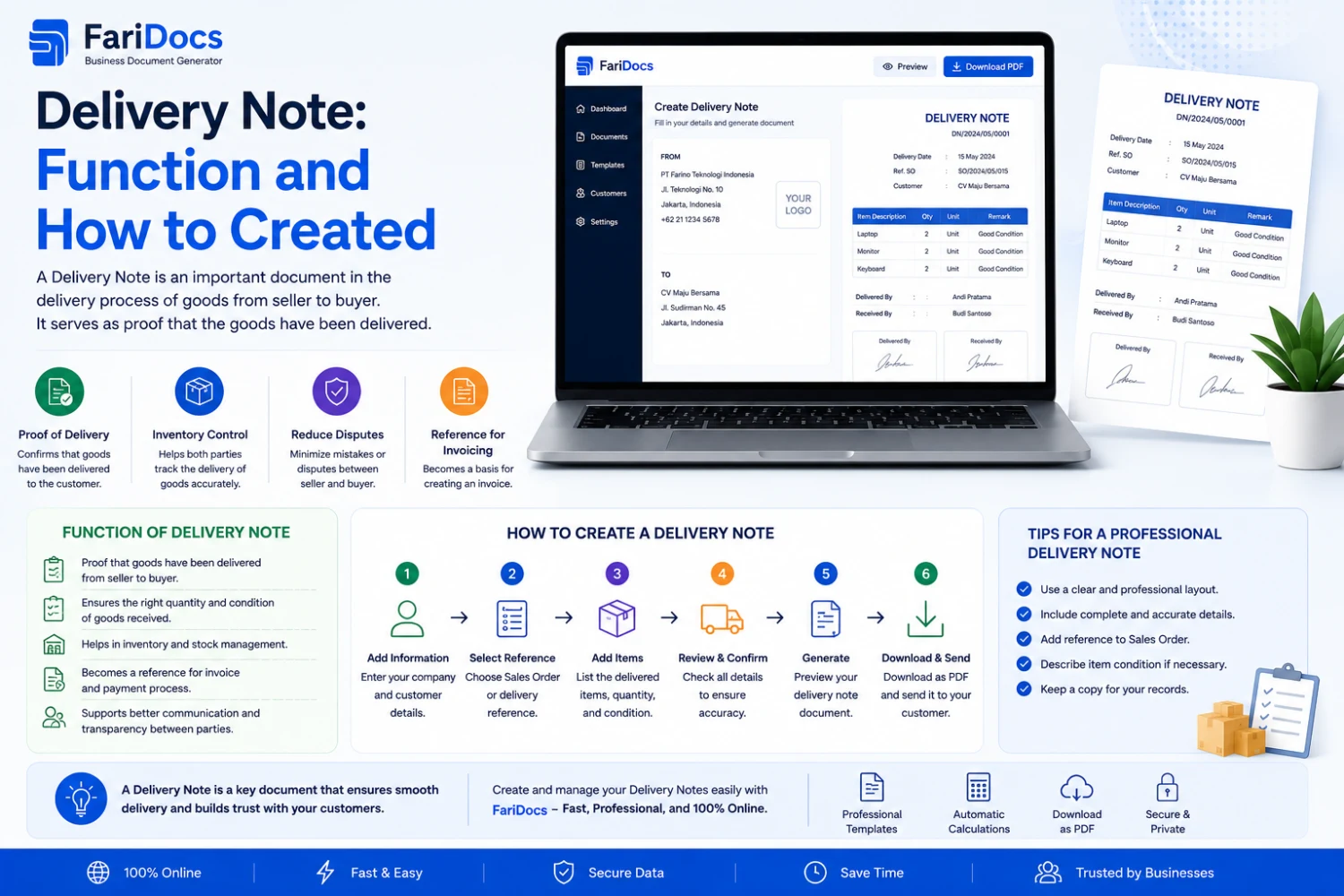
A Delivery Note is a document that accompanies or records the delivery of goods from a company to a customer or recipient.
A Delivery Note typically includes:
- Sender information
- Recipient information
- Products being delivered
- Quantity
- Sales Order reference
- Delivery date
- Shipping address
- Delivery information
- Receiver confirmation
Delivery Notes may be used by:
- Sales teams
- Warehouse teams
- Logistics teams
- Delivery teams
- Customer service
- Finance
- Customers
What Is the Purpose of a Delivery Note?
1. Document the Delivery
The primary purpose of a Delivery Note is to document that goods are being delivered from the company to the recipient.
2. Describe the Goods Being Delivered
A Delivery Note allows the recipient to verify:
- Product
- Quantity
- Unit
- SKU
- Order reference
- Other relevant information
3. Support Goods Inspection
When goods arrive, the customer can compare the physical shipment with the Delivery Note.
For example:
ProductQuantityLaptop10Monitor10Keyboard10The customer can then verify whether the shipment matches the document.
4. Provide Delivery Confirmation
A Delivery Note may contain fields for:
- Receiver name
- Date received
- Signature
- Company stamp
- Delivery notes
The signed document can then serve as delivery documentation according to the company's process.
5. Support Warehouse Operations
Warehouse staff can use the Delivery Note as a reference when preparing goods.
This can help reduce:
- Wrong products
- Incorrect quantities
- Wrong customer
- Wrong shipping destination
6. Support Billing
In certain business workflows, delivery documentation may be used as a reference for billing, particularly when invoicing is triggered after delivery or receipt.
A common workflow may be:
Sales Order → Delivery Note → Invoice
However, billing rules vary between companies and contracts.
Delivery Note vs Invoice
A Delivery Note and Invoice may relate to the same transaction, but they serve different purposes.
AspectDelivery NoteInvoicePurposeDelivery documentationBillingFocusGoods deliveredAmount payableQuantityGoods deliveredGoods/services billedPriceMay be omittedUsually includedPayment amountNot the primary focusPrimary focusReceiver signatureCommonNot always requiredMain usersWarehouse/Logistics/CustomerFinance/CustomerThe easiest way to remember the difference:
Delivery Note = What was delivered?
Invoice = What needs to be paid?
Delivery Note vs Sales Order
A Sales Order records:
What did the customer order?
A Delivery Note records:
What was actually delivered?
For example:
Customer orders:
100 units
Sales Order:
Ordered = 100
The company delivers:
60 units
Delivery Note:
Delivered = 60
Remaining:
40
A second delivery can then be created:
Delivered = 40
Total:
100
This is especially useful for partial delivery management.
What Information Should a Delivery Note Include?
A Delivery Note format depends on the company's needs, but it commonly includes the following.
Company Information
- Company name
- Logo
- Address
- Phone
- Website
Delivery Information
- Delivery Note number
- Delivery date
- Sales Order number
- Customer reference
- Warehouse
- Delivery status
Example:
Delivery Note No.: DN-2026-00125
Date: August 26, 2026
SO No.: SO-2026-00125
Customer Information
- Customer name
- Company
- Billing address
- Shipping address
- Contact person
- Phone number
Product Details
No.ProductSKUQuantityUnit1Laptop ProLP-00110Unit224" MonitorMN-02410Unit3KeyboardKB-00110UnitDelivery Information
Depending on the business, this section may include:
- Driver
- Vehicle number
- Courier
- Shipping method
- Warehouse
- Delivery address
Receiving Confirmation
The document can include:
Delivered By
Name:
Received By
Name:
Date:
Signature:
Notes:
Delivery Note Example
DELIVERY NOTE
ABC Indonesia
Delivery Note No.: DN-2026-00125
Date: August 26, 2026
Customer:
XYZ Indonesia
Shipping Address:
Jakarta, Indonesia
Reference:
SO-2026-00125
No.ProductQuantityUnit1Laptop10Unit2Monitor10Unit3Keyboard10UnitNotes:
Goods received in good condition.
Delivered By
Name & Signature
Received By
Name & Signature
How to Create a Delivery Note
A company can create a Delivery Note manually using Word or Excel.
However, manual document creation can become inefficient as transaction volume increases.
A more structured workflow is:
Step 1 — Create a Sales Order
Create a Sales Order based on:
- Quotation
- Customer Purchase Order
- Customer order
- Contract
Example:
SO-2026-00125
Order:
100 units
Step 2 — Confirm the Order
Once the Sales Order is confirmed, warehouse staff can see what needs to be prepared.
Step 3 — Prepare the Goods
Warehouse staff perform picking and packing.
The system may show:
Ordered: 100
Prepared: 100
Step 4 — Create the Delivery Note
The Delivery Note is created from the Sales Order.
Information such as:
- Customer
- Shipping address
- Product
- Quantity
- Sales Order number
can be reused.
This avoids entering the same information repeatedly.
Step 5 — Ship the Goods
The Delivery Note accompanies the shipment or is provided digitally according to the company's process.
Step 6 — Customer Receives the Goods
The customer checks the shipment and provides confirmation where required.
Step 7 — Update Delivery Status
The system can update the status to:
Delivered
or:
Partially Delivered
Step 8 — Create the Invoice
If the company's billing workflow uses delivery as a billing reference, the transaction can proceed to invoicing.
Workflow:
Sales Order → Delivery Note → Invoice
Creating Delivery Notes with Farinotech SaaS
A SaaS platform can connect Sales Orders and Delivery Notes into one workflow.
Example:
Customer ↓ Quotation ↓ Sales Order ↓ Warehouse ↓ Delivery Note ↓ Customer Receipt ↓ Invoice ↓ PaymentSales Order data can be reused when creating the Delivery Note.
Example Farinotech SaaS Delivery Workflow
1. Sales Order
Sales creates:
SO-2026-00125
Customer:
XYZ Indonesia
Order:
100 units
2. Warehouse Receives the Order
Warehouse staff see the order that needs to be processed.
3. Create Delivery Note
The user selects:
Create Delivery Note
The system retrieves:
- Customer
- Address
- Product
- Quantity
- Sales Order
- Reference
4. Define Delivery Quantity
For example:
Order:
100 units
Delivery:
60 units
The system records:
Ordered = 100
Delivered = 60
Remaining = 40
5. Generate Delivery Note
The system generates a unique Delivery Note.
Example:
DN-2026-00125
6. Customer Receives the Goods
The customer verifies the shipment and provides receipt confirmation where required.
7. Update Status
Status:
Partially Delivered
After the remaining 40 units are shipped:
Delivered
Benefits of Digital Delivery Notes
Using SaaS for Delivery Note management can help businesses:
Reduce Duplicate Data Entry
Sales Order information can be reused.
Reduce Errors
Customer, address, product, and quantity data can come directly from the transaction.
Manage Partial Deliveries
Track:
- Ordered
- Delivered
- Remaining
Speed Up Warehouse Operations
Warehouse staff can quickly see what needs to be shipped.
Improve Delivery Tracking
Management can monitor delivery status.
Improve Documentation
Delivery records can be stored digitally.
Connect Sales and Finance
Delivery information can support the invoice workflow when applicable.
Delivery Note Status
A digital system can use statuses such as:
Draft
Delivery Note is being prepared.
Ready to Ship
Goods are ready for shipment.
Shipped
Goods have been shipped.
Partially Delivered
Only part of the order has been delivered.
Delivered
Delivery has been completed according to the applicable workflow.
Cancelled
Delivery has been cancelled.
Delivery Notes for Partial Deliveries
Partial delivery is one of the most useful scenarios for digital Delivery Note management.
For example:
Customer orders:
500 units
Warehouse currently has:
300 units
First delivery:
DN-001 = 300 units
Remaining:
200 units
After new stock arrives:
Second delivery:
DN-002 = 200 units
Total delivered:
500 units
A digital system can maintain the complete delivery history and remaining quantities.
Delivery Note and Inventory
Delivery Notes can also be connected to inventory management.
For example:
Warehouse stock:
1,000 units
Customer order:
100 units
Delivery:
100 units
Remaining stock:
900 units
If the SaaS platform is integrated with inventory management, the delivery process can update stock according to the system's business rules.
Delivery Note and Invoice
Delivery Notes and Invoices can form part of one business workflow:
Sales Order
↓
Delivery Note
↓
Invoice
↓
Payment
However, businesses may use different billing models.
Invoices may be issued:
- Before delivery
- After delivery
- Based on milestones
- Based on subscriptions
- Based on contracts
- Based on agreed payment terms
A flexible SaaS system should therefore support different workflows.
FAQ
What is a Delivery Note?
A Delivery Note is a document used to accompany or document the delivery of goods from a company to a customer or recipient.
What is the purpose of a Delivery Note?
It documents the shipment, describes the goods delivered, supports goods inspection, and can provide delivery confirmation.
Is a Delivery Note the same as a shipping document?
The terminology varies between businesses and countries. In many contexts, a Delivery Note is used as a document accompanying or recording the delivery of goods.
What is the difference between a Delivery Note and an Invoice?
A Delivery Note focuses on the goods delivered, while an Invoice focuses on billing and payment.
What is the difference between a Sales Order and a Delivery Note?
A Sales Order records what the customer ordered, while a Delivery Note records what was delivered.
Does a Delivery Note need to include prices?
Not necessarily. Many businesses exclude prices because the primary purpose of the document is delivery and receipt confirmation.
Can a Delivery Note be created from a Sales Order?
Yes. A digital sales management system can create a Delivery Note based on Sales Order data.
Can one Sales Order have multiple Delivery Notes?
Yes. This is common when a customer order is fulfilled through multiple shipments.
Can a Delivery Note be used to create an Invoice?
In some workflows, delivery information can be used as a reference for invoicing. The exact process depends on the company's billing policy and contractual terms.
Conclusion
A Delivery Note is an important part of the sales and logistics process.
If a Quotation represents the offer, a Sales Order represents the customer order, and an Invoice represents billing, the Delivery Note documents the delivery of goods.
A common workflow is:
Quotation → Sales Order → Delivery Note → Invoice → Payment
By using SaaS, companies can connect sales, warehouse, delivery, and finance processes in a more structured workflow.
With Farinotech SaaS, businesses can build a digital process for:
Customer → Quotation → Sales Order → Delivery Note → Invoice → Payment
This can reduce repetitive data entry, improve delivery visibility, support partial deliveries, and organize transaction documentation.