Businesses sometimes need to adjust an Invoice after it has been issued.
For example:
- A customer returns goods.
- Products are damaged.
- The original price was incorrect.
- An additional discount is granted.
- The invoiced quantity was incorrect.
- Additional charges need to be recorded.
- A transaction needs to be partially corrected.
In these situations, businesses may use a Credit Note or Debit Note.
Both are adjustment documents, but they serve different purposes.
Simply put:
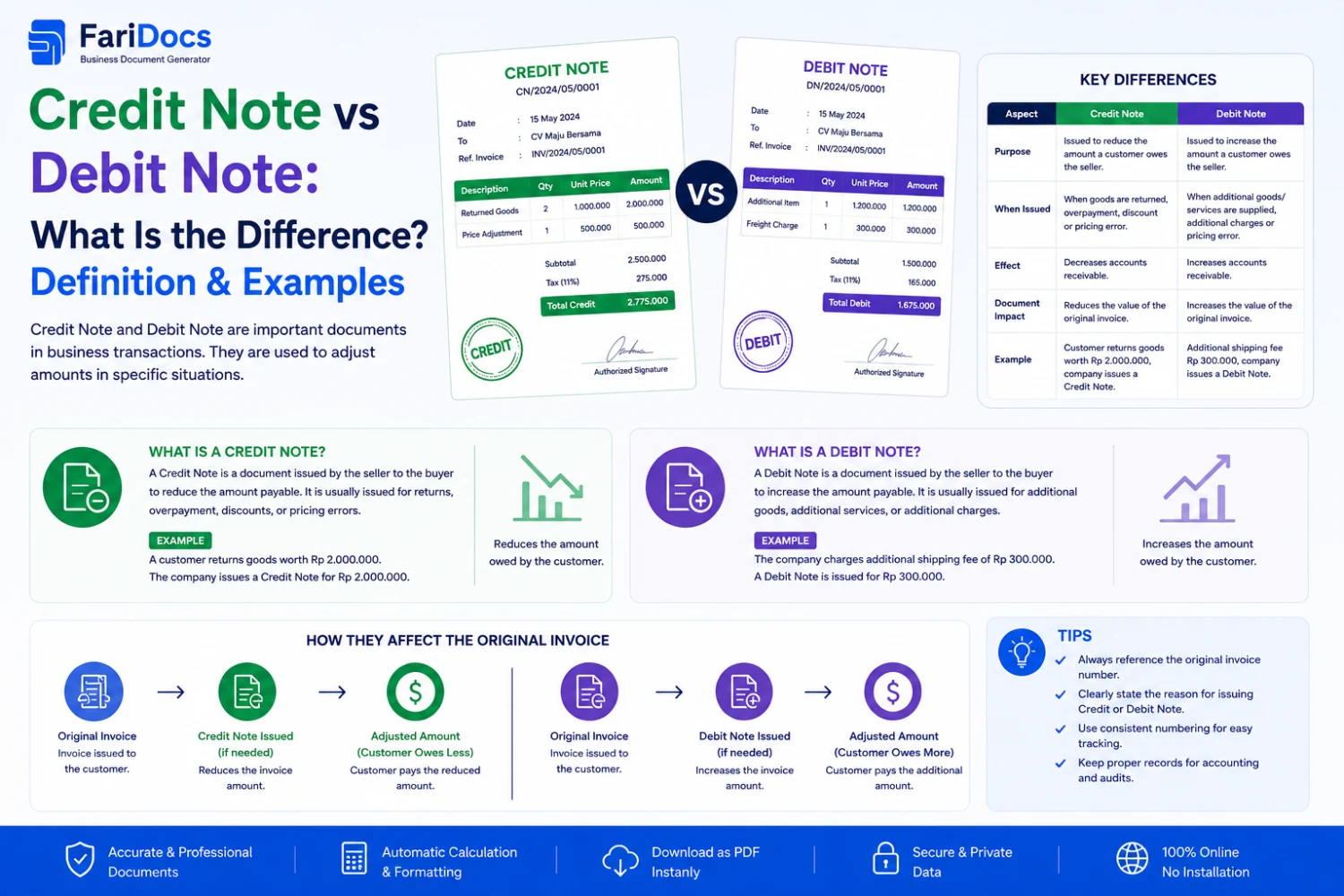
A Credit Note generally reduces the amount previously invoiced.
A Debit Note generally increases the amount payable or records a specific adjustment, depending on the business context.
Understanding the difference is important for Sales, Finance, Accounting, Procurement, and Customer Service teams.
What Is a Credit Note?
A Credit Note is a document used to reduce part or all of the amount previously invoiced.
It may be issued when:
- Goods are returned.
- Products are damaged.
- The customer was overcharged.
- A quantity was incorrect.
- An additional discount is granted.
- Part of a transaction is cancelled.
- A pricing correction is required.
Simple example
A customer purchases:
10 units × IDR 1,000,000 = IDR 10,000,000
The customer later returns:
2 units
Adjustment:
2 × IDR 1,000,000 = IDR 2,000,000
The seller may issue a:
Credit Note = IDR 2,000,000
What Is the Purpose of a Credit Note?
1. Reduce the Invoice Amount
Example:
Original Invoice: IDR 20,000,000
Credit Note: IDR 3,000,000
Adjusted Amount: IDR 17,000,000
2. Record Product Returns
When customers return goods, a Credit Note can document the corresponding financial adjustment.
3. Correct Pricing
If an Invoice contains an incorrect price, a Credit Note can be used to adjust the amount.
4. Record Additional Discounts
If an additional discount is granted after the Invoice was issued, a Credit Note may be used to document the adjustment.
5. Reverse Part of a Charge
When part of a transaction is cancelled, the related amount can be adjusted through a Credit Note.
What Is a Debit Note?
A Debit Note is a document used to record an additional adjustment to a transaction, which may increase the amount payable or represent a specific claim or adjustment depending on the business context.
It may be used for:
- Additional charges
- Underbilling
- Shipping adjustments
- Additional services
- Administrative fees
- Price adjustments
- Other transaction corrections
The exact meaning and accounting treatment of a Debit Note can vary depending on the transaction and the perspective of the issuing party.
What Is the Purpose of a Debit Note?
1. Increase the Amount Payable
Example:
Original Invoice: IDR 10,000,000
Additional charge:
IDR 500,000
Debit Note:
IDR 500,000
Adjusted amount:
IDR 10,500,000
2. Correct Underbilling
Suppose the correct transaction value is:
IDR 15,000,000
But the original Invoice was:
IDR 14,000,000
Difference:
IDR 1,000,000
A Debit Note may be used to document the additional adjustment.
3. Record Additional Charges
Examples include:
- Shipping surcharge
- Handling fees
- Administrative fees
- Additional services
- Price adjustments
Credit Note vs Debit Note
AspectCredit NoteDebit NoteMain purposeReduce transaction/billing amountIncrease amount or record an adjustmentEffectUsually decreases amount payableMay increase amount payableProduct returnsCommonGenerally not the primary documentAdditional discountCommon useGenerally notOverbilling correctionCommonNoUnderbilling correctionNoCan be usedAdditional chargesNot typicalCommon useExampleProduct returnAdditional shipping costEasy way to remember:
Credit Note → Credit → Reduce
Debit Note → Debit → Increase
However, accounting terminology should always be interpreted based on the accounts and perspective of the party recording the transaction.
Credit Note Example
Suppose:
10 laptops × IDR 10,000,000
Original Invoice:
IDR 100,000,000
The customer returns two damaged laptops.
Returned value:
2 × IDR 10,000,000 = IDR 20,000,000
Credit Note:
IDR 20,000,000
Adjusted transaction value:
IDR 80,000,000
Debit Note Example
Original Invoice:
IDR 100,000,000
Additional shipping cost:
IDR 5,000,000
Debit Note:
IDR 5,000,000
Adjusted amount:
IDR 105,000,000
The exact accounting treatment should follow the company's accounting policy and applicable requirements.
Credit Note for Product Returns
One of the most common Credit Note use cases is product returns.
A typical workflow is:
Customer Order
↓
Sales Order
↓
Delivery
↓
Invoice
↓
Customer Returns Product
↓
Credit Note
↓
Invoice Adjustment
Example:
Invoice:
IDR 50,000,000
Returned goods:
IDR 5,000,000
Credit Note:
IDR 5,000,000
Adjusted amount:
IDR 45,000,000
Debit Note for Additional Charges
A Debit Note may be useful when additional costs need to be added.
Example:
Original Invoice:
IDR 50,000,000
Additional charge:
IDR 2,500,000
Debit Note:
IDR 2,500,000
Adjusted amount:
IDR 52,500,000
Does a Credit Note Cancel an Invoice?
Not necessarily.
A Credit Note usually reduces part or all of an existing Invoice.
Example:
Invoice INV-001 = IDR 100,000,000
Credit Note CN-001 = IDR 20,000,000
Adjusted balance = IDR 80,000,000
The original Invoice remains part of the transaction history, while the Credit Note records the adjustment.
Does a Debit Note Create a New Invoice?
Not necessarily.
A Debit Note can be used as an adjustment document related to an existing Invoice.
For example:
Invoice = IDR 100,000,000
Debit Note = IDR 5,000,000
Adjusted amount = IDR 105,000,000
The exact workflow depends on the company's invoicing and accounting procedures.
When Should You Use a Credit Note?
A Credit Note can be used when a business needs to reduce a transaction or billing amount.
Common situations include:
- Product returns
- Damaged goods
- Overbilling
- Additional discounts
- Partial cancellations
- Price corrections
When Should You Use a Debit Note?
A Debit Note can be used when an additional adjustment is required.
Examples include:
- Underbilling
- Additional charges
- Shipping adjustments
- Additional services
- Price adjustments
How to Create a Credit Note
Step 1 — Select the Customer
Enter:
- Customer name
- Company
- Address
- Contact
Step 2 — Reference the Original Invoice
Example:
Original Invoice: INV-2026-00125
Referencing the original document makes the adjustment easier to track.
Step 3 — Select the Adjustment Reason
Examples:
- Product return
- Damaged goods
- Price correction
- Additional discount
- Partial cancellation
Step 4 — Add the Items
Enter:
- Product
- Quantity
- Unit price
- Amount
Step 5 — Review the Adjustment
Check:
- Subtotal
- Discount
- Applicable tax
- Total adjustment
Step 6 — Generate the Credit Note
Example:
CN-2026-00025
Step 7 — Link It to the Invoice
The system can display:
Original Invoice: IDR 100 million
Credit Note: IDR 20 million
Adjusted Balance: IDR 80 million
How to Create a Debit Note
The workflow is similar.
Step 1
Select the customer or vendor according to the transaction context.
Step 2
Reference the original document.
Invoice: INV-2026-00125
Step 3
Select the reason.
Additional Shipping Cost
Step 4
Enter the adjustment amount.
IDR 5,000,000
Step 5
Review the document.
Step 6
Generate the Debit Note.
DN-2026-00025
Step 7
Link it to the original transaction.
Credit Note and Debit Note in Farinotech SaaS
For Farinotech SaaS, Credit Note and Debit Note can be integrated into an Invoice Adjustment Workflow.
Example:
Customer ↓ Quotation ↓ Sales Order ↓ Delivery Note ↓ Invoice ↓ Payment ↓ Adjustment ├── Credit Note └── Debit NoteThis structure allows adjustments to remain connected to the original transaction.
Credit Note Workflow in Farinotech SaaS
Step 1 — Invoice
INV-2026-00100
Amount:
IDR 100,000,000
Step 2 — Customer Returns Goods
Return value:
IDR 10,000,000
Step 3 — Credit Note
CN-2026-00020
Amount:
IDR 10,000,000
Step 4 — Adjusted Balance
Original:
IDR 100,000,000
Credit:
IDR 10,000,000
Adjusted:
IDR 90,000,000
Step 5 — Payment
Customer pays according to the adjusted transaction.
Debit Note Workflow in Farinotech SaaS
Original Invoice
IDR 100,000,000
Additional Charge
IDR 5,000,000
Debit Note
DN-2026-00010
Amount:
IDR 5,000,000
Adjusted Amount
IDR 105,000,000
With connected documents, Finance teams can identify the source of an adjustment without manually searching through multiple transactions.
Benefits of Digital Credit Notes and Debit Notes
Using SaaS for Credit Note and Debit Note management can help businesses:
Reduce Data Entry
Customer and transaction information can be reused.
Speed Up Adjustments
Finance teams do not have to recreate the entire transaction.
Improve Tracking
Each adjustment can be linked to its original Invoice.
Improve Visibility
Teams can view:
Original Invoice → Adjustment → Payment
Improve Audit Trail
Transaction adjustments can be documented in a structured digital workflow.
Credit Note vs Debit Note vs Invoice
DocumentMain PurposeQuotationSales offerSales OrderCustomer orderDelivery NoteDelivery documentationInvoiceBillingCredit NoteReduction adjustmentDebit NoteAdditional adjustmentPaymentPaymentPayment ReceiptPayment recordA typical workflow can be:
Quotation → Sales Order → Delivery Note → Invoice → Credit/Debit Note → Payment
Not every transaction requires every document.
FAQ
What is a Credit Note?
A Credit Note is a document used to reduce part or all of an existing transaction or Invoice.
What is a Debit Note?
A Debit Note is a document used to record an additional transaction adjustment that may increase the amount payable or represent a specific claim.
What is the difference between a Credit Note and a Debit Note?
Generally, a Credit Note reduces the amount billed, while a Debit Note can increase the amount payable or record a specific adjustment depending on the transaction context.
Is a Credit Note the same as a refund?
No. A Credit Note is an adjustment document. A refund is the actual return of money. A Credit Note may be part of a process that eventually results in a refund.
Does a Credit Note reduce an Invoice?
Yes. It is commonly used to reduce part or all of an Invoice.
When should a Credit Note be used?
It can be used for product returns, overbilling, pricing corrections, additional discounts, and partial cancellations.
When should a Debit Note be used?
It can be used for underbilling, additional charges, shipping adjustments, additional services, or certain transaction corrections.
Should Credit Notes have unique numbers?
Yes. Unique numbering makes them easier to track.
Should a Credit Note reference the original Invoice?
Yes, when it is an adjustment against a specific Invoice, referencing the original document improves traceability.
Is a Debit Note the same as an Invoice?
Not necessarily. A Debit Note is generally an adjustment document and does not automatically replace an Invoice.
Can Credit Notes and Debit Notes be created digitally?
Yes. Invoicing software and SaaS platforms can help businesses create, connect, and track these documents digitally.
Conclusion
Credit Notes and Debit Notes are both used to adjust business transactions, but they serve different purposes.
The simplest way to remember them is:
Credit Note → generally reduces the billed amount.
Debit Note → generally increases the amount payable or records a specific adjustment.
For modern businesses, connecting these documents with Quotation, Sales Order, Delivery Note, Invoice, Payment, and Payment Receipt can create a more structured transaction workflow.
With Farinotech SaaS, businesses can organize sales documents, invoice adjustments, payments, and transaction history in one connected digital workflow.