A quotation is one of the most important documents in the sales process.
It provides a customer with information about the products or services being offered, pricing, quantities, discounts, taxes, payment terms, delivery conditions, and other commercial terms.
A professional quotation does more than display a price.
It helps customers understand the offer quickly and gives your company a more professional and credible image.
In contrast, an incomplete quotation with unclear pricing or missing terms can create confusion and make it harder for a customer to move forward.
This guide explains how to create a professional quotation for customers, what information should be included, common mistakes to avoid, and how SaaS software can help businesses manage quotations digitally.
What Is a Quotation?
A quotation is a document prepared by a seller or business to provide a customer with an offer for products or services, including pricing and commercial terms.
A quotation is commonly created after a customer expresses interest in a product or service.
For example, a customer may request pricing for:
- 20 laptops
- 20 software licenses
- Installation services
- Maintenance services
The sales team can then create a quotation containing the relevant products, prices, discounts, taxes, total amount, payment terms, and delivery conditions.
In simple terms:
A quotation is a seller's formal offer of products or services, pricing, and commercial terms to a prospective customer.
A quotation is not the same as an invoice or a Proforma Invoice.
What Is the Purpose of a Quotation?
1. Provide Pricing
The primary purpose of a quotation is to communicate pricing to a prospective customer.
It can show:
- Product or service
- Quantity
- Unit price
- Discount
- Tax
- Shipping
- Total amount
2. Explain Products or Services
A quotation can provide detailed information about what is being offered.
For products:
- Product name
- Model
- SKU
- Specifications
- Quantity
For services:
- Service description
- Scope of work
- Duration
- Deliverables
- Service level
3. Support Negotiation
A quotation often becomes the starting point for commercial discussions.
Customers may request:
- Discounts
- Different quantities
- Specification changes
- Payment term changes
- Delivery changes
The seller can then revise the quotation based on the negotiation.
4. Support Customer Approval
B2B purchases often require internal approval.
A quotation can be used as supporting documentation for:
- Procurement
- Finance
- Management
- Purchasing
- Department heads
5. Provide a Basis for a Sales Order
After the customer accepts the quotation, its information can be used to create a Sales Order.
A common workflow is:
Quotation → Customer Approval → Sales Order → Delivery → Invoice → Payment
How to Create a Professional Quotation
1. Include Clear Company Information
Your quotation should clearly identify the seller.
Include:
- Company name
- Logo
- Address
- Phone number
- Website
- Business or tax information where relevant
2. Include Customer Information
The quotation should identify the customer.
Example:
Customer: ABC Indonesia Ltd.
Contact Person: John Smith
Email: customer@example.com
Phone: +62 xxx xxxx xxxx
Address: Jakarta, Indonesia
3. Use a Unique Quotation Number
Every quotation should have a unique reference number.
Example:
QT-2026-000125
A quotation number makes it easier to:
- Track quotations
- Find documents
- Prevent duplicates
- Follow up with customers
- Link quotations to Sales Orders
- Generate sales reports
4. Include the Quotation Date
Example:
Quotation Date: August 24, 2026
The quotation date provides a clear reference point for the offer and validity period.
5. Set a Validity Period
A professional quotation should specify how long the offer remains valid.
Example:
This quotation is valid for 30 days from the quotation date.
This is particularly useful when product prices or exchange rates may change.
6. Describe Products or Services Clearly
Avoid descriptions that are too vague.
Instead of:
Laptop — $1,000
provide more information:
ProductDescriptionQtyUnit PriceTotalBusiness LaptopCore i7, 16GB RAM, 512GB SSD10$1,000$10,000For services, clearly define the scope of work.
Example:
Website Development
- UI/UX Design
- Front-end Development
- Back-end Development
- Database Integration
- Testing
- Deployment
Clear descriptions reduce misunderstandings.
7. Display Pricing Clearly
A professional quotation should clearly show:
- Unit price
- Quantity
- Subtotal
- Discount
- Tax
- Shipping
- Grand total
Example:
DescriptionAmountSubtotal$10,000Discount$500Tax$1,045Shipping$100Grand Total$10,6458. Explain Discounts
If a discount is offered, show it clearly.
Example:
Subtotal: $10,000
Discount 5%: -$500
Transparent pricing helps customers understand the final amount.
9. Explain Taxes
If applicable, clearly explain how taxes are calculated.
Example:
Subtotal: $10,000
Discount: $500
Tax: 11%
Grand Total: $10,545
Tax treatment should follow applicable regulations and the nature of the transaction.
10. Include Payment Terms
Payment terms explain when and how the customer should pay.
Examples include:
- 100% advance
- 50% advance, 50% before delivery
- Net 30
- Net 45
- Net 60
For projects:
30% down payment
40% after development milestone
30% after project completion
11. Explain Delivery Terms
For products, include:
- Estimated delivery date
- Delivery location
- Shipping method
- Shipping cost
- Lead time
For services, include:
- Project start date
- Project duration
- Milestones
- Delivery schedule
12. Add Terms and Conditions
Terms and Conditions can clarify the commercial agreement.
Example:
Terms & Conditions
- This quotation is valid for 30 days.
- Prices are subject to applicable taxes.
- Delivery times depend on product availability.
- Payment must follow the agreed payment terms.
- Changes to product specifications may affect the quoted price.
- Cancellation is subject to the company's cancellation policy.
13. Include the Sales Contact
Customers should know who to contact.
Example:
Sales Representative: John
Email: sales@example.com
Phone: +62 xxx xxxx xxxx
This makes follow-up easier.
14. Use a Professional Design
A quotation is part of your company's customer communication.
Use a design that is:
- Clean
- Professional
- Easy to read
- Consistent with your brand
- Clearly structured
Avoid excessive design elements that make pricing difficult to find.
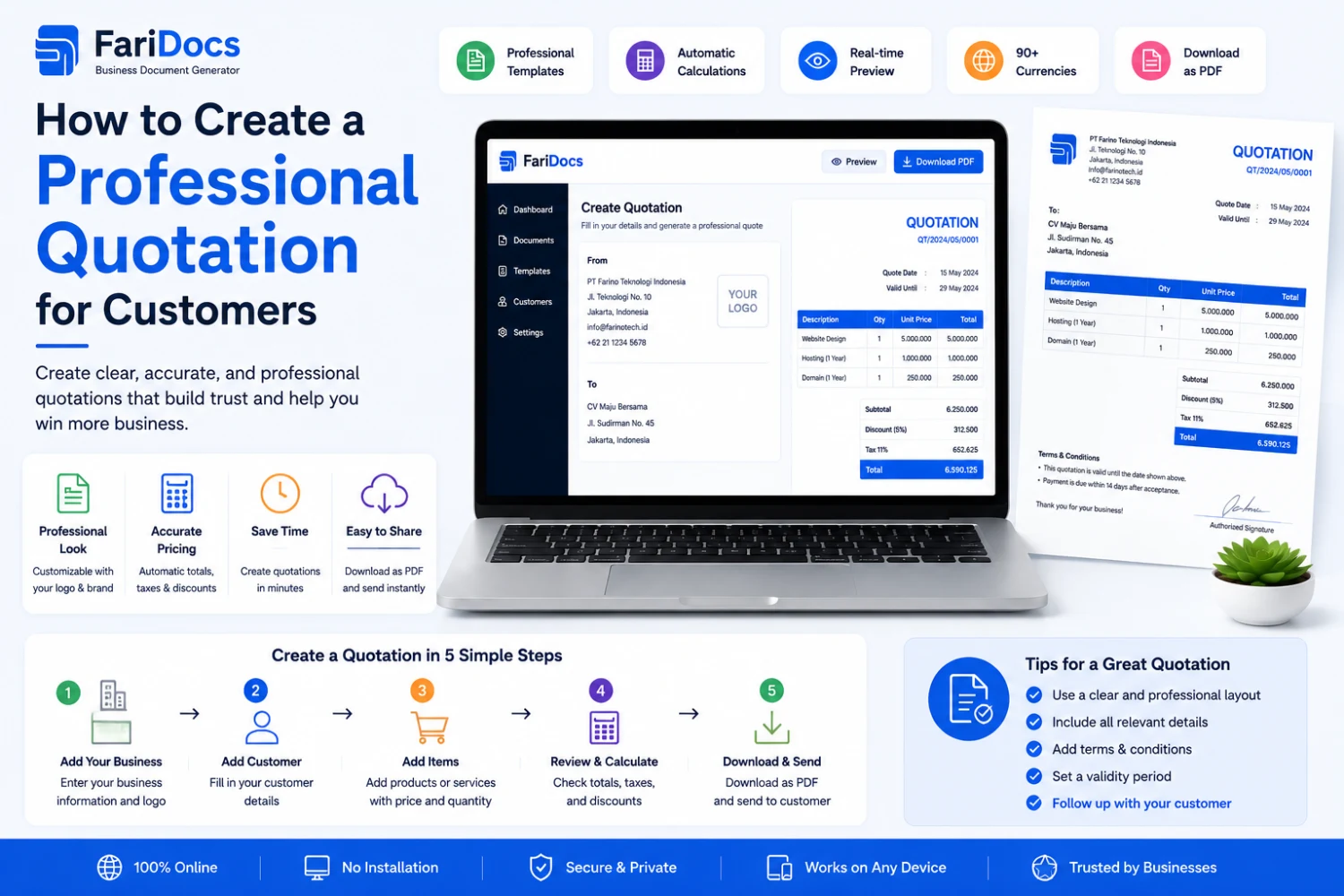
Professional Quotation Example
QUOTATION
Quotation Number: QT-2026-000125
Date: August 24, 2026
Valid Until: September 23, 2026
From
Example Indonesia Ltd.
Jakarta, Indonesia
Email: sales@example.com
Phone: +62 xxx xxxx xxxx
To
ABC Customer Ltd.
Attn: Procurement Department
Jakarta, Indonesia
Products & Services
No.Product/ServiceDescriptionQtyUnit PriceTotal1Business LaptopCore i7 / 16GB / 512GB SSD10$1,000$10,0002InstallationInstallation service1$500$500Subtotal: $10,500
Discount: $500
Tax: $1,100
Grand Total: $11,100
Payment Terms
50% advance and 50% before delivery.
Delivery
Estimated 7–14 business days after payment confirmation.
Validity
This quotation is valid for 30 days from the quotation date.
Terms & Conditions
Applicable terms and conditions should be listed here.
Quotation vs Invoice
Quotation and invoice have different purposes.
AspectQuotationInvoicePurposeSales offerBillingTimingBefore final transactionAccording to billing termsPriceOffered priceAmount being billedStatusNot a billBilling documentPaymentNot necessarily dueUsed for payment processingSimply:
Quotation = "Here is our offer."
Invoice = "Here is the amount due for the transaction."
Quotation vs Proforma Invoice
Quotation and Proforma Invoice are also different.
A Quotation generally provides a commercial offer to a prospective customer.
A Proforma Invoice generally provides preliminary transaction details before the final invoice is issued.
A possible workflow is:
Quotation → Customer Approval → Sales Order → Proforma Invoice → Invoice
Not every business requires every document.
Read the related guide: Proforma Invoice: Definition, Purpose, and When to Use It.
Quotation vs Sales Order
A quotation is a seller's offer.
A Sales Order is created after the customer accepts the order according to the company's sales workflow.
Example:
Customer Request
↓
Quotation
↓
Customer Acceptance
↓
Sales Order
↓
Delivery
↓
Invoice
↓
Payment
Sales software can reuse quotation data when creating a Sales Order, reducing duplicate data entry.
Common Quotation Mistakes
1. No Quotation Number
Without a unique number, tracking becomes difficult.
2. Unclear Pricing
Customers may not know whether taxes, discounts, or shipping are included.
3. No Validity Period
Customers may assume that the price remains valid indefinitely.
4. Poor Product Descriptions
Customers may misunderstand what they are purchasing.
5. Unclear Payment Terms
This can create disputes after the customer accepts the offer.
6. Unclear Service Scope
For projects, unclear scope can lead to disputes.
7. Missing Terms and Conditions
Important commercial conditions may not be documented.
8. Outdated Templates
Old prices, company information, or bank details may remain in the document.
9. Calculation Errors
Incorrect quantities, discounts, taxes, or totals can cause financial losses.
10. No Follow-Up
A quotation should be tracked after it is sent.
How Can SaaS Software Help Create Quotations?
Creating quotations manually with Excel or Word becomes increasingly difficult as the number of customers grows.
A SaaS quotation system can help automate the process.
Example:
Customer
↓
Create Quotation
↓
Approval
↓
Send Quotation
↓
Customer Accepts
↓
Sales Order
↓
Invoice
↓
Payment
Quotation statuses can include:
- Draft
- Pending Approval
- Sent
- Viewed
- Accepted
- Rejected
- Expired
- Converted to Sales Order
Key Features of Quotation Software
When choosing quotation software, consider features such as:
Customer Management
Maintain customer data in one centralized system.
Product & Service Catalog
Allow sales representatives to quickly select products and services.
Automatic Calculations
Automatically calculate subtotal, discounts, taxes, and grand total.
Automatic Quotation Numbering
Generate unique quotation numbers.
PDF Generation
Generate professional PDF quotations.
Email Integration
Send quotations directly to customers.
Approval Workflow
Require manager approval for high-value quotations.
Quotation Status Tracking
Monitor the status of every quotation.
Expiration Management
Track quotations that are approaching their expiry date.
Sales Order Conversion
Convert accepted quotations into Sales Orders.
Reporting Dashboard
Track:
- Total quotations
- Accepted quotations
- Rejected quotations
- Expired quotations
- Conversion rate
- Sales value
- Sales performance
How to Create Quotations Faster with Digital Tools
Manual process:
Excel → Calculate Price → Create PDF → Email → Manual Follow-Up → Update Spreadsheet
Digital process:
Customer → Quotation → Approval → Send → Track → Accept → Sales Order
A digital quotation system can reduce administrative work and allow sales teams to spend more time engaging with customers.
Why Quotation Management Matters for Sales
Quotation management is an important part of the sales pipeline.
Example:
Lead
↓
Opportunity
↓
Quotation
↓
Negotiation
↓
Won/Lost
Without proper quotation management, management may not know:
- How many quotations are active
- Total potential sales value
- How many quotations were accepted
- How many were rejected
- How many expired
- Which sales representative has the best conversion rate
A quotation management system can make this information available through dashboards and reports.
Digital Quotation Management with Farinotech SaaS
Businesses with many customers and sales transactions can use a SaaS platform to manage quotations through an integrated workflow.
For example:
Customer Management
↓
Products & Services
↓
Quotation
↓
Approval
↓
Customer Acceptance
↓
Sales Order
↓
Delivery
↓
Invoice
↓
Payment
An integrated workflow allows quotation data to flow into the next stage without repeatedly entering the same information.
This can improve:
- Sales efficiency
- Data accuracy
- Visibility
- Document management
- Quotation tracking
- Reporting
- Customer experience
Farinotech can support businesses with software and cloud application development tailored to specific business workflows.
Quotation FAQ
What is a quotation?
A quotation is a document prepared by a seller to offer products or services to a prospective customer, including pricing, quantities, and commercial terms.
What should a quotation include?
A professional quotation generally includes seller and customer information, quotation number, date, products or services, quantity, pricing, discounts, taxes, total amount, payment terms, delivery terms, validity period, and terms and conditions.
How do you create a professional quotation?
Use clear company information, a unique quotation number, customer details, detailed product or service descriptions, transparent pricing, validity period, payment terms, delivery terms, and appropriate terms and conditions.
Is a quotation the same as an invoice?
No. A quotation is a sales offer, while an invoice is a billing document.
Is a quotation the same as a Proforma Invoice?
No. A quotation is generally a commercial offer, while a Proforma Invoice provides preliminary transaction details before the final invoice.
How long should a quotation be valid?
There is no universal period. Companies may set validity periods such as 7, 14, or 30 days depending on pricing, product availability, exchange rates, and business policy.
Does a quotation need to be signed?
Not always. Signature or acceptance requirements depend on the company's policies and the transaction agreement.
Can a quotation be changed after it has been sent?
Yes. However, changes should ideally be tracked through versions or a revised quotation so the document history remains clear.
How can a company manage many quotations?
A company can use quotation software, CRM, or a sales management system to create, send, track, approve, and report on quotations digitally.
Conclusion
A quotation is an important part of the sales process because it is one of the first formal commercial communications between a company and its customer.
A professional quotation should be clear, complete, transparent, and easy to understand.
At minimum, it should include:
- Company information
- Customer information
- Quotation number
- Date
- Products or services
- Quantity
- Pricing
- Discounts
- Taxes
- Total amount
- Payment terms
- Delivery terms
- Validity period
- Terms & Conditions
- Sales contact
For businesses managing a large number of customers and transactions, quotation software or a SaaS sales management platform can reduce manual work and improve control over the sales pipeline.
An integrated workflow can connect:
Lead → Quotation → Approval → Customer Acceptance → Sales Order → Invoice → Payment
Digital quotation management can help businesses create quotations faster, reduce errors, track customer responses, and gain better insight into sales performance.