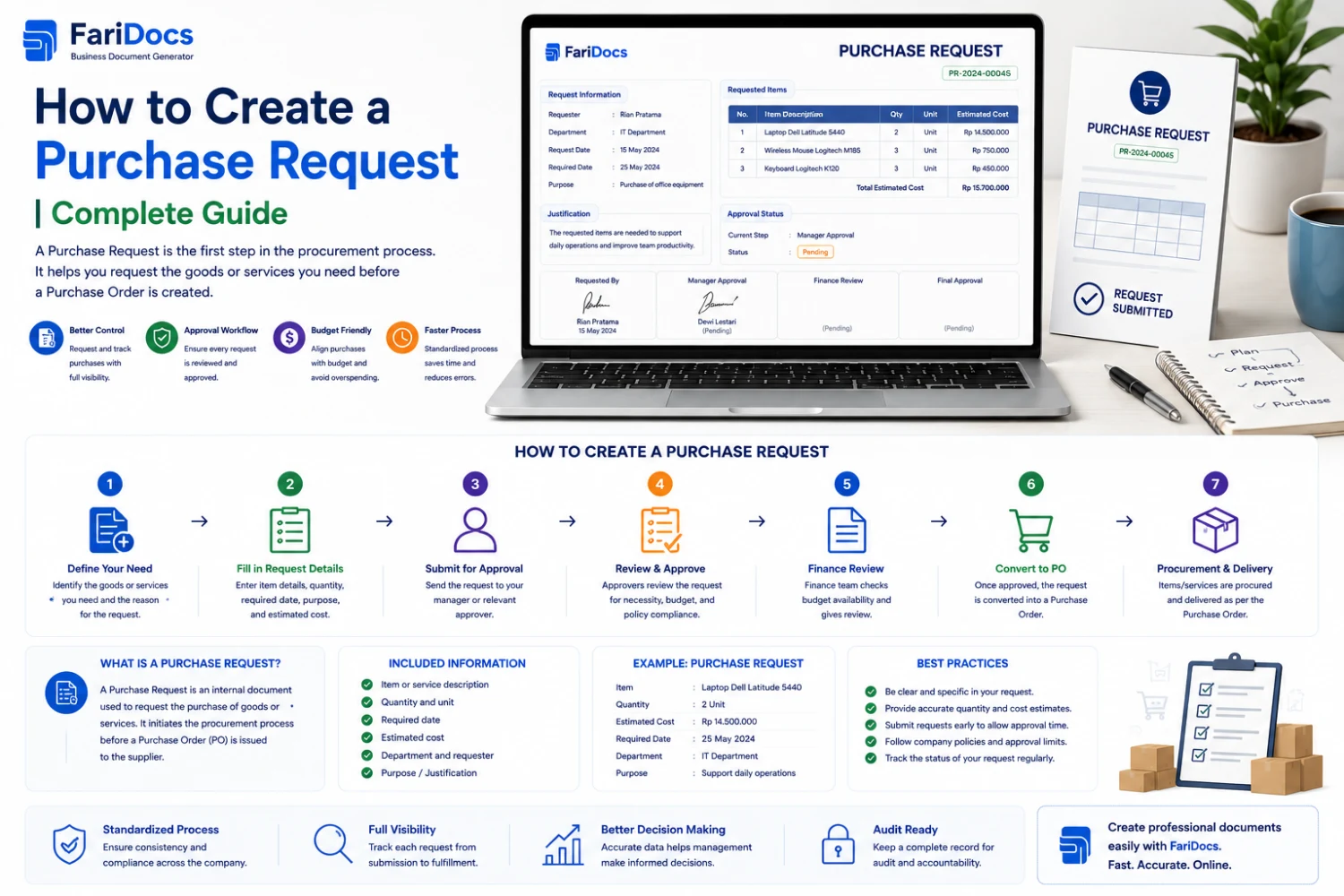
A Purchase Request (PR) is an internal request created by an employee, department, or project team to formally request the purchase of goods or services.
Knowing how to create a purchase request correctly is important because a well-structured PR helps businesses maintain better control over procurement, budgets, approvals, and purchasing activities.
A Purchase Request is generally an internal document and should not be confused with a Purchase Order (PO).
A typical process is:
Purchase Request → Approval → Procurement → Purchase Order → Supplier → Delivery → Invoice → Payment
What Is a Purchase Request?
A Purchase Request is an internal procurement document used to communicate that a department or employee needs specific goods or services.
For example, an IT department may need five new laptops for new employees.
Instead of directly purchasing the laptops, the department creates a Purchase Request containing:
- Item name
- Specifications
- Quantity
- Estimated price
- Business justification
- Required date
- Department
- Project
- Supporting documents
The PR is then reviewed and approved according to the company's procurement policy.
After approval, the procurement team can continue with supplier selection and Purchase Order creation.
Why Is a Purchase Request Important?
A properly prepared Purchase Request provides several benefits.
1. Better Budget Control
Purchase Requests allow businesses to review spending before a purchase is made.
2. Clear Procurement Requirements
A PR clearly explains what the business needs, how much is required, and why it is needed.
3. Faster Approval
A complete request gives approvers the information they need to make decisions.
4. Better Procurement Transparency
Businesses can track the status of each request from submission through approval and procurement.
5. Reduced Unauthorized Purchases
Approval workflows can ensure that purchases receive the required authorization.
6. Better Audit Documentation
Purchase Requests provide a record of who requested a purchase, why it was requested, who approved it, and when it was processed.
How to Create a Purchase Request Step by Step
1. Define the Purchase Requirement
Start by clearly identifying what needs to be purchased.
Avoid descriptions that are too general.
Instead of:
Laptop – 5 units
Use:
Business laptop, 14-inch display, minimum 16 GB RAM, 512 GB SSD, business-class processor, 5 units.
Clear specifications make procurement easier.
2. Specify the Quantity
Always provide the required quantity.
Example:
ItemQuantityUnitBusiness Laptop5Unit24-inch Monitor5UnitKeyboard5Unit3. Explain the Business Justification
A good Purchase Request should explain why the purchase is necessary.
Example:
The purchase of five laptops is required to support newly hired employees in the Finance Department.
A clear justification helps approvers understand the business purpose.
4. Identify the Department or Project
Include the requesting department.
Examples include:
- IT
- Finance
- Marketing
- Human Resources
- Operations
- Sales
- Project Management
If the purchase is project-related, include the project name or project code.
5. Add the Estimated Budget
If available, include estimated pricing.
ItemQtyEstimated Unit PriceTotalLaptop5Rp10,000,000Rp50,000,000Monitor5Rp2,000,000Rp10,000,000TotalRp60,000,000
Estimated costs help management and finance evaluate the request against the available budget.
6. Specify the Required Date
The required date tells procurement when the goods or services are needed.
Example:
Required Date: September 30, 2026
This is important because procurement may need time for:
- PR processing
- Approval
- Vendor sourcing
- Quotation comparison
- Purchase Order creation
- Delivery
7. Add a Preferred Supplier if Necessary
Some companies allow requesters to recommend a supplier.
If applicable, supplier information can be included in the PR.
However, supplier selection should still follow the company's procurement policy.
8. Attach Supporting Documents
Supporting documents may include:
- Supplier quotation
- Product specifications
- Proposal
- Project documents
- Budget documents
- Technical requirements
Attachments provide additional context for reviewers and approvers.
Purchase Request Format
There is no single universal Purchase Request format. Businesses can customize the structure according to their procurement process.
A typical format includes:
Purchase Request Information
PR Number: PR-2026-0001
Request Date: September 3, 2026
Requester: Employee Name
Department: IT
Project: Internal IT Infrastructure
Required Date: September 30, 2026
Priority: Normal
Purchase Details
No.ItemSpecificationQtyUnitEstimated Price1Laptop16 GB RAM, 512 GB SSD5UnitRp10,000,0002Monitor24-inch Full HD5UnitRp2,000,000Estimated Total: Rp60,000,000
Business Purpose:
Purchase of equipment for newly hired employees.
Attachments:
Product specifications / quotation / supporting documents.
Approval:
Department Manager → Finance → Procurement Manager
Purchase Request Example
Purchase Request: Laptop Procurement
Request Number: PR-2026-0025
Request Date: September 3, 2026
Requester: IT Department
Department: Information Technology
Required Date: September 30, 2026
Purchase Details
ItemSpecificationQtyEstimated Unit PriceTotalBusiness Laptop14", 16 GB RAM, 512 GB SSD5Rp10,000,000Rp50,000,000Business Purpose:
To provide work devices for five newly hired employees.
Estimated Budget: Rp50,000,000
Priority: Normal
Approval Required:
IT Manager → Finance Manager → Procurement
Once approved, the request can move to the procurement and Purchase Order process according to company policy.
Purchase Request Workflow
A typical Purchase Request workflow looks like this:
Requester
↓
Create Purchase Request
↓
Submit PR
↓
Manager Review
↓
Finance / Budget Review
↓
Procurement Review
↓
Approval
↓
Supplier Selection / Quotation
↓
Purchase Order
↓
Goods / Services Received
↓
Invoice & Payment
The exact workflow can vary depending on company policies, transaction values, departments, and procurement categories.
Purchase Request vs Purchase Order
Purchase Request and Purchase Order serve different purposes.
Purchase RequestPurchase OrderInternal purchase requestOfficial purchase documentUsually created by requesterUsually created by purchasing/procurementUsed internallySent to supplier/vendorRequires internal approvalUsed to place an orderComes before POUsually created after PR approvalUnderstanding this difference is important when designing an effective procurement workflow.
Common Purchase Request Mistakes
Avoid these common mistakes when creating a PR:
1. Unclear Item Description
Avoid descriptions such as "software" or "laptop" without additional specifications.
2. Missing Business Justification
Approvers need to understand why the purchase is required.
3. Missing Quantity
Always specify how many units are required.
4. Missing Required Date
Procurement needs to understand when the goods or services are needed.
5. Missing Supporting Documents
Include quotations, specifications, or proposals where appropriate.
6. Ignoring Approval Rules
PRs should follow the company's approval matrix.
7. Creating the PR After the Purchase
Ideally, the Purchase Request should be submitted before the purchase is made.
How to Manage Purchase Requests with SaaS
A SaaS application can help businesses digitize their Purchase Request workflow.
Instead of managing requests through disconnected spreadsheets, email threads, and documents, businesses can structure the process as:
Create PR → Submit → Review → Approval → Procurement → PO
A digital Purchase Request system can be designed to manage information such as:
- PR Number
- Request Date
- Requester
- Department
- Project
- Item
- Description
- Quantity
- Unit
- Estimated Price
- Budget
- Required Date
- Priority
- Attachments
- Approval Status
- Approval History
This creates better visibility into the status of procurement requests.
Purchase Request Approval Workflow
Approval is one of the most important parts of a Purchase Request process.
A simple workflow could be:
Employee
→ Creates PR
Department Manager
→ Reviews business need
Finance
→ Reviews budget
Procurement
→ Processes procurement
Management
→ Approves according to transaction value
Companies can also create approval thresholds.
For example:
PR ValueApproval< Rp5 millionDepartment ManagerRp5–50 millionDepartment Manager + Finance> Rp50 millionDepartment Manager + Finance + ManagementThese values are examples only. Each organization should establish its own approval matrix.
Best Practices for Creating a Purchase Request
Be Specific
Clearly describe the required goods or services.
Use Accurate Data
Verify quantities, estimated prices, and budget information.
Explain the Business Need
Provide a clear justification.
Set a Required Date
Tell procurement when the purchase is needed.
Add Supporting Documents
Attach quotations, proposals, or technical specifications when necessary.
Use an Approval Workflow
Make sure the request reaches the appropriate approvers.
Maintain an Audit Trail
Keep records of request creation, reviews, approvals, rejections, and processing.
Internal Linking Strategy for Farinotech.id
To strengthen topical authority and internal SEO, this article can be connected with related procurement and business-document articles.
Recommended internal links:
Anchor TextRelated ArticlePurchase Request vs Purchase OrderPurchase Request vs Purchase Order: What Is the Difference?Purchase Request Approval WorkflowPurchase Request Approval Workflow: Complete GuideProcurement Management SystemWhat Is a Procurement Management System?How to Create a Professional QuotationHow to Create a Professional QuotationPurchase OrderPurchase Order GuideProforma InvoiceProforma Invoice: Definition, Purpose, and When to Use ItDelivery NoteDelivery Note: Function and How to Create OneUse contextual links naturally within paragraphs instead of placing all internal links in a separate list. This creates a stronger relationship between articles in the procurement content cluster.
FAQ: How to Create a Purchase Request
What is a Purchase Request?
A Purchase Request is an internal document used by an employee or department to request the purchase of goods or services.
What should a Purchase Request include?
A PR typically includes the PR number, requester, department, item, specifications, quantity, estimated price, business justification, required date, supporting documents, and approval information.
Who creates a Purchase Request?
A Purchase Request is usually created by the employee or department that needs the goods or services.
Is a Purchase Request the same as a Purchase Order?
No. A Purchase Request is an internal request, while a Purchase Order is an official purchasing document generally issued to a supplier.
Why does a Purchase Request need approval?
Approval helps businesses control spending, verify business requirements, and ensure purchases are authorized.
Can Purchase Requests be managed through SaaS?
Yes. A SaaS application can be used to digitize Purchase Request creation, submission, approval, tracking, and documentation according to the organization's workflow.
Conclusion
Knowing how to create a proper Purchase Request is essential for businesses that want a more organized procurement process.
A good PR should clearly communicate the item, specification, quantity, estimated budget, business justification, required date, department, and supporting documents.
When combined with a structured approval workflow and SaaS-based business process, Purchase Requests can become an important part of a more transparent and efficient procurement system.
For businesses looking to digitize procurement and operational workflows, Farinotech SaaS can be positioned as part of a broader business process digitalization strategy.