Managing business purchasing involves much more than simply buying products from suppliers.
Companies often need to manage multiple steps, including:
- Purchase Requests.
- Approval.
- Supplier selection.
- Supplier quotations.
- Price comparison.
- Purchase Orders.
- Goods receiving.
- Supplier invoices.
- Payment.
When these processes are handled manually through spreadsheets, emails, chat applications, and separate documents, companies may face:
- Poor visibility.
- Slow approvals.
- Duplicate data.
- Manual Purchase Orders.
- Difficult transaction tracking.
- Scattered supplier information.
- Higher risk of data-entry errors.
- Difficult invoice verification.
- Limited audit trails.
This is where a Procurement Management System becomes valuable.
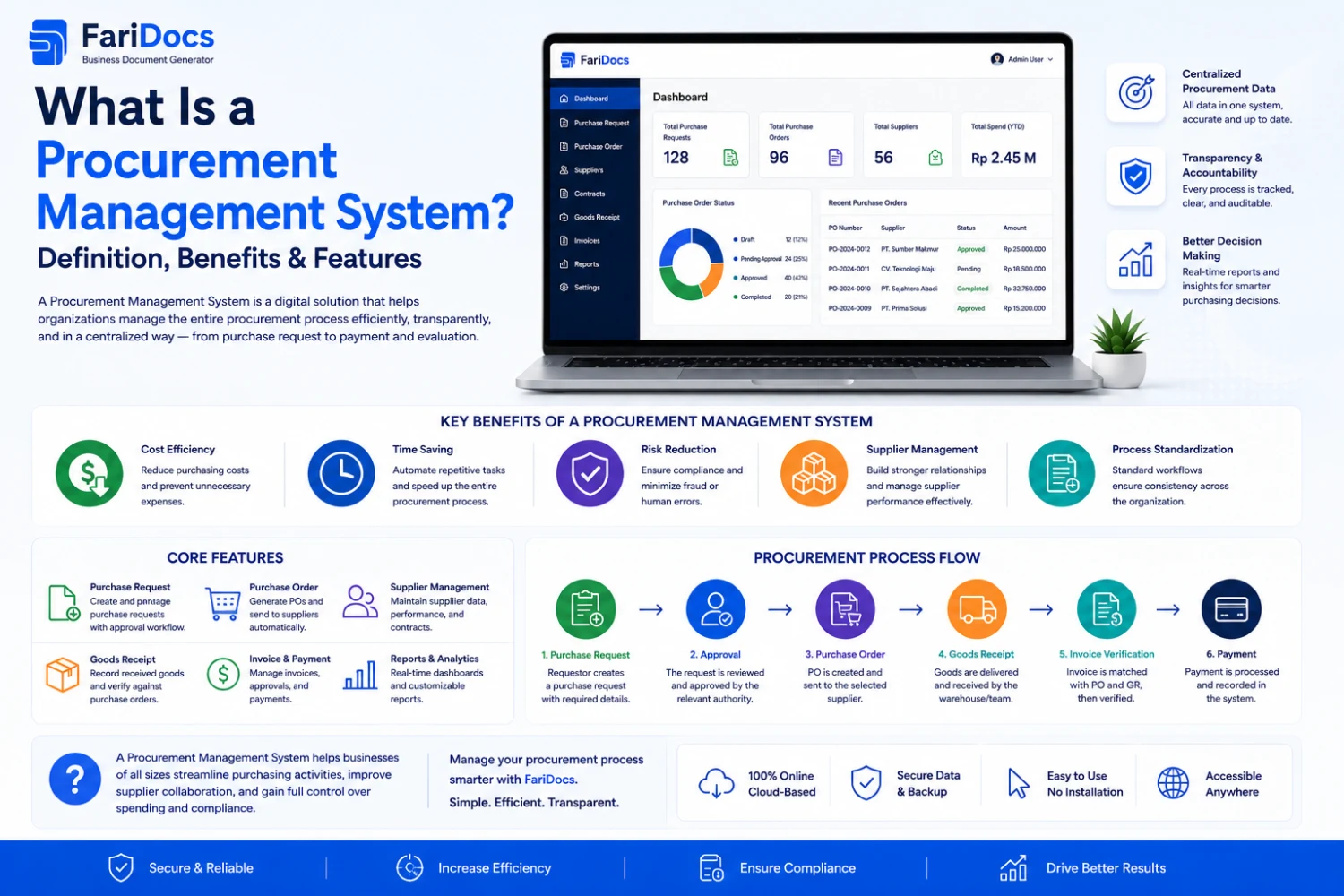
A Procurement Management System is software or a digital platform used to manage, automate, and monitor the procurement process from purchase requests through purchasing, receiving, invoicing, and payment.
What Does Procurement Mean?
Procurement refers to the overall process a company uses to obtain the goods and services required to operate its business.
Procurement may include:
- Identifying business needs.
- Purchase Requests.
- Approval.
- Supplier sourcing.
- Supplier evaluation.
- Price comparison.
- Negotiation.
- Purchase Orders.
- Goods receiving.
- Invoice verification.
- Payment.
Therefore, procurement is broader than purchasing.
Procurement Management System Definition
A Procurement Management System is a digital platform that helps businesses manage procurement activities through an integrated workflow.
A typical workflow can connect:
Purchase Request → Approval → Supplier → Purchase Order → Receiving → Invoice → Payment
This creates a structured digital record of procurement activities.
Procurement vs Purchasing
Procurement and purchasing are related but not identical.
ProcurementPurchasingBroader procurement processPurchasing activitySupplier strategyPurchase executionSupplier evaluationPurchase OrderSourcingOrderingNegotiationReceivingContract managementInvoice/paymentPurchase RequestTransaction executionProcurement covers the broader sourcing and purchasing lifecycle, while purchasing focuses more specifically on buying activities.
Why Do Businesses Need a Procurement Management System?
As businesses grow, procurement becomes increasingly complex.
A company may have:
- Multiple departments.
- Hundreds of Purchase Requests.
- Many suppliers.
- Thousands of products.
- Numerous Purchase Orders.
- Multiple approval levels.
Managing all of this manually can consume significant administrative time.
A Procurement Management System helps make procurement more:
Structured → Transparent → Trackable → Documented → Efficient
Procurement Management System Functions
1. Purchase Request Management
Employees or departments can submit Purchase Requests digitally.
Example:
The IT department needs:
10 laptops
The user creates:
PR-2026-0010
2. Procurement Approval
The system can support approval workflows.
Example:
Employee
↓
Department Manager
↓
Procurement
↓
Finance
↓
Management
Approval levels can be configured according to company policies.
3. Supplier Management
A procurement system can store supplier information such as:
- Supplier name.
- Contact person.
- Email.
- Phone number.
- Address.
- Products.
- Transaction history.
- Purchase Orders.
- Supplier status.
4. Purchase Order Management
Once the purchase request has been approved and a supplier selected, procurement can create a Purchase Order.
Example:
PO-2026-00125
Supplier:
ABC Company
Items:
10 Laptops
Total:
IDR 150,000,000
5. Procurement Tracking
Users can monitor transaction status.
Example:
Draft
→
Submitted
→
Approved
→
PO Created
→
Ordered
→
Partially Received
→
Received
→
Completed
This reduces the need for manual status requests through email or chat.
Procurement Management System Workflow
A typical procurement workflow can look like this:
Purchase Request ↓ Approval ↓ Supplier Selection ↓ Supplier Quotation ↓ Price Comparison ↓ Purchase Order ↓ Goods / Service Receipt ↓ Supplier Invoice ↓ Verification ↓ Payment ↓ CompletedThe exact workflow may vary depending on the company's policies and organizational structure.
Purchase Request in Procurement
A Purchase Request is an internal request to purchase goods or services.
Example:
The Marketing department needs:
20 promotional merchandise items
Marketing creates:
PR-2026-0010
The request may contain:
- Item.
- Quantity.
- Required date.
- Estimated price.
- Purpose.
- Department.
- Requester.
The PR then enters the approval process.
Purchase Order in Procurement
After approval and supplier selection, procurement can create a Purchase Order.
A PO may contain:
- PO number.
- Supplier.
- Product/service.
- Quantity.
- Unit price.
- Total.
- Delivery address.
- Payment terms.
- Delivery terms.
The PO is then sent to the supplier as the company's purchase document.
Procurement Management System vs Manual Procurement
AspectManual ProcurementProcurement Management SystemPurchase RequestEmail/ExcelDigitalApprovalManualWorkflowSupplier dataScatteredCentralizedPurchase OrderManualDigitalTrackingDifficultStatus-basedDocument historyScatteredConnectedReportingManualEasierAudit trailLimitedStructuredAutomationLowHigherBenefits of a Procurement Management System
Save Time
Digital workflows can reduce repetitive administrative tasks.
Reduce Errors
Structured data can reduce duplicate data entry and manual mistakes.
Improve Transparency
Users can track Purchase Request and Purchase Order status.
Improve Monitoring
Procurement managers can monitor:
- Pending transactions.
- Approved requests.
- Open Purchase Orders.
- Received goods.
- Completed transactions.
Centralize Supplier Data
Supplier information can be maintained in one system.
Improve Procurement Control
Approval rules can be based on:
- Department.
- Budget.
- Transaction value.
- Position.
- Procurement category.
Improve Auditability
Connected documents create a clearer procurement history.
Procurement Management System Features
A procurement platform may include:
Purchase Request
Create and manage purchase requests.
Approval Workflow
Configure approval processes.
Supplier Management
Manage supplier databases.
Supplier Quotation
Store supplier quotations.
Price Comparison
Compare supplier prices.
Purchase Order
Create and manage POs.
Goods Receipt
Record received products.
Invoice Matching
Connect supplier invoices with purchase transactions.
Payment Tracking
Monitor payment status.
Procurement Reporting
Generate procurement reports.
Audit Trail
Track transaction activity and changes.
What Is Procurement Automation?
Procurement automation means using technology to automate part or all of the procurement process.
For example:
PR Created
↓
Approval notification
↓
PR Approved
↓
PO created
↓
PO Sent
↓
Goods received
↓
Goods Received
↓
Invoice processed
↓
Payment
Automation reduces dependence on manual communication for every stage.
Procurement Management System for Businesses
Procurement software can be useful for:
- Retail companies.
- Distributors.
- Manufacturers.
- Technology companies.
- Contractors.
- Construction companies.
- Service businesses.
- Educational institutions.
- Organizations with multiple departments.
The more complex a company's purchasing process becomes, the more valuable a structured procurement system can be.
Procurement Management System for Small Businesses
Procurement software is not only for large enterprises.
Small businesses can use procurement systems to manage:
- Suppliers.
- Purchase Requests.
- Purchase Orders.
- Product purchases.
- Supplier pricing.
- Goods receiving.
- Supplier invoices.
- Payments.
Implementing structured procurement processes early can also make it easier for businesses to scale.
Procurement Management System in Farinotech SaaS
Farinotech SaaS can support businesses in organizing digital business document workflows.
A procurement workflow can be structured as:
REQUEST ↓ PURCHASE REQUEST ↓ APPROVAL ↓ SUPPLIER ↓ PURCHASE ORDER ↓ DELIVERY / RECEIVING ↓ SUPPLIER INVOICE ↓ PAYMENTThis approach connects internal purchasing needs with supplier transactions.
Procurement Workflow Example in Farinotech
Suppose the IT department needs:
5 laptops
Step 1 — Purchase Request
IT creates:
PR-2026-0050
Quantity:
5 Laptops
Step 2 — Approval
The request is submitted to the manager.
Status:
Pending Approval
After approval:
Approved
Step 3 — Supplier Selection
Procurement evaluates suppliers based on:
- Price.
- Quality.
- Availability.
- Delivery time.
- Payment terms.
Step 4 — Purchase Order
Procurement creates:
PO-2026-0100
Supplier:
ABC Company
Quantity:
5 Laptops
Step 5 — Delivery
The supplier delivers the products.
The receiving team records the goods received.
Step 6 — Supplier Invoice
The supplier sends an Invoice.
The Invoice can then be verified against the purchasing transaction.
Step 7 — Payment
Finance processes payment according to the approved transaction.
Procurement Document Flow
A connected procurement workflow can look like:
Purchase Request ↓ Approval ↓ Supplier Quotation ↓ Purchase Order ↓ Delivery / Goods Receipt ↓ Supplier Invoice ↓ PaymentNot every business requires every document, but connecting the relevant documents can make procurement easier to manage.
Procurement Management System vs ERP
A Procurement Management System is not necessarily the same as an ERP.
A Procurement Management System focuses primarily on procurement and purchasing workflows.
An ERP (Enterprise Resource Planning) platform generally covers multiple business functions, such as:
- Finance.
- Accounting.
- Procurement.
- Inventory.
- Sales.
- HR.
- Manufacturing.
A procurement system can be a standalone solution or part of a broader ERP environment.
How to Choose a Procurement Management System
Before selecting procurement software, consider:
1. Workflow
Does the system support your procurement process?
2. Approval
Can approval rules be customized?
3. Supplier Management
Can supplier information be centralized?
4. Purchase Request
Can employees easily create PRs?
5. Purchase Order
Can approved PRs be converted into POs?
6. Reporting
Does the platform provide procurement reports?
7. Integration
Can procurement connect with other business modules?
8. Scalability
Can the system handle increasing transaction volumes?
9. Security
Can access be controlled by user roles?
10. Cloud / SaaS
Can users access the system remotely?
FAQ: Procurement Management System
What is a Procurement Management System?
A Procurement Management System is software used to manage and monitor the procurement process digitally.
What does procurement software do?
It can manage Purchase Requests, approvals, suppliers, quotations, Purchase Orders, receiving, invoices, payments, and reporting.
What is the difference between procurement and purchasing?
Procurement covers the broader sourcing and purchasing lifecycle, while purchasing focuses primarily on buying activities.
What is a Purchase Request?
A Purchase Request is an internal request to purchase goods or services.
What is a Purchase Order?
A Purchase Order is a formal purchasing document issued to a supplier.
Is a Procurement Management System an ERP?
Not necessarily. Procurement software focuses on procurement, while an ERP generally covers multiple business functions.
What are the benefits of procurement software?
It can improve efficiency, visibility, tracking, documentation, and procurement control.
Can small businesses use procurement software?
Yes. Small businesses can use procurement systems to organize supplier and purchasing workflows.
Can procurement be automated?
Yes. Approval workflows, notifications, document creation, status tracking, and other activities can be automated depending on the system.
What is the relationship between a Purchase Request and Purchase Order?
A Purchase Request is an internal request, while a Purchase Order is the formal purchase document sent to a supplier after the required internal process.
Conclusion
A Procurement Management System helps businesses manage procurement activities through a structured digital workflow.
Instead of relying on disconnected spreadsheets, emails, and documents, businesses can connect:
Purchase Request → Approval → Supplier → Purchase Order → Receiving → Invoice → Payment
A connected procurement system can improve visibility, tracking, documentation, and administrative efficiency.
Farinotech SaaS can support digital business workflows by connecting procurement documents and related business processes in one platform.