Purchase Request vs Purchase Order: What Is the Difference?
In business procurement, Purchase Request (PR) and Purchase Order (PO) are two important documents used during the purchasing process.
Although they are closely related, they serve different purposes.
The simplest way to understand them is:
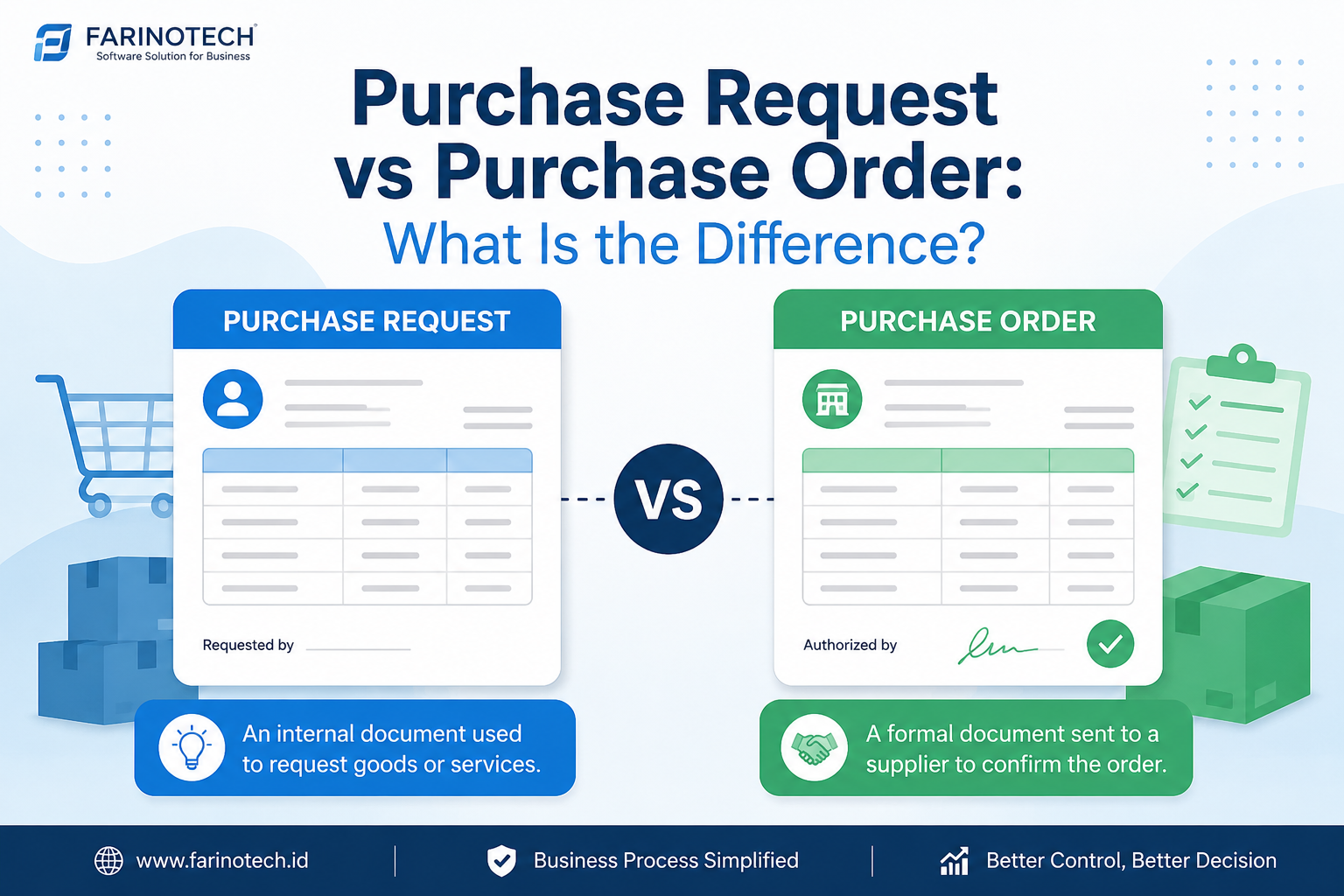
A Purchase Request is an internal request to purchase goods or services, while a Purchase Order is an official document sent to a supplier to place an order.
Understanding the difference between Purchase Request and Purchase Order is essential for companies that want to maintain purchasing control, approval workflows, accurate records, and transparent procurement operations.
As companies grow, managing procurement through spreadsheets, email, and disconnected documents can become increasingly difficult. A digital procurement system can help centralize purchasing workflows and make every transaction easier to track.
What Is a Purchase Request?
A Purchase Request (PR), also known as a Purchase Requisition, is an internal document used by an employee or department to request the purchase of goods or services.
A Purchase Request is not normally sent to the supplier.
Instead, it starts the internal procurement process.
For example, an IT department may need:
- 10 business laptops
- 10 software licenses
- 2 network switches
- Network installation services
The department can create a Purchase Request containing the required items, quantities, estimated costs, business justification, and required date.
Example of a Purchase Request
InformationExampleRequesterIT DepartmentItemBusiness LaptopQuantity10 unitsEstimated PriceIDR 15,000,000/unitEstimated TotalIDR 150,000,000Business ReasonNew employee onboardingRequired DateSeptember 15, 2026StatusPending ApprovalThe request can then go through the company's approval workflow.
In short: A Purchase Request answers, "What does the company need to buy?"
What Is a Purchase Order?
A Purchase Order (PO) is an official purchasing document issued by a buyer to a supplier.
It is normally created after the purchasing requirement has been reviewed and approved and the supplier has been selected.
A Purchase Order typically includes:
- PO number
- Buyer information
- Supplier information
- Product or service description
- Quantity
- Unit price
- Total price
- Taxes
- Payment terms
- Delivery address
- Delivery date
- Terms and conditions
Example of a Purchase Order
After the Purchase Request for 10 laptops has been approved and a supplier has been selected, the procurement team can create a Purchase Order.
InformationExamplePO NumberPO-2026-00125SupplierABC TechnologyProductBusiness LaptopQuantity10 unitsUnit PriceIDR 15,000,000SubtotalIDR 150,000,000Payment Terms30 DaysDelivery LocationJakartaStatusIssuedThe PO is then sent to the supplier to formally place the order.
In short: A Purchase Order answers, "What are we officially ordering from the supplier?"
Purchase Request vs Purchase Order: Key Differences
The main difference between a Purchase Request and a Purchase Order is their purpose and position within the procurement process.
AspectPurchase RequestPurchase OrderPurposeRequest a purchase internallyOfficially order goods/servicesNatureInternalExternalCreated byRequester/departmentPurchasing/procurementRecipientInternal approverSupplier/vendorStatusPurchase requestOfficial purchase orderPriceMay be estimatedUsually agreed priceSupplierMay not yet be selectedSupplier is normally selectedApprovalUsually requires internal approvalIssued according to authorization policyMain functionStart the procurement processPlace the orderSimple explanation:
Purchase Request → Approval → Procurement → Supplier Selection → Purchase Order → Delivery → Invoice → Payment
PR and PO are therefore not interchangeable documents. They are two connected stages of the procurement workflow.
Which Comes First: Purchase Request or Purchase Order?
In a standard procurement workflow, the Purchase Request comes first.
A typical process looks like this:
1. A department identifies a need
For example, the IT department needs 20 laptops.
2. The requester creates a Purchase Request
The request includes the required products, quantity, estimated budget, business justification, and required date.
3. The request goes through approval
A manager or authorized person reviews the request.
4. Procurement processes the request
The procurement team reviews specifications, suppliers, pricing, and purchasing requirements.
5. A supplier is selected
The company may compare quotations, negotiate pricing, or use an approved supplier list.
6. A Purchase Order is created
The procurement team creates a PO containing the agreed purchasing details.
7. The PO is sent to the supplier
The supplier receives the official order.
8. Goods or services are delivered
The company receives the ordered goods or services.
9. Receiving is recorded
The receiving team verifies the delivery.
10. The invoice is verified and paid
Finance processes the supplier invoice according to the company's payment workflow.
Why Are Purchase Requests and Purchase Orders Important?
PR and PO processes provide more than administrative documentation.
They can help companies improve procurement control and accountability.
1. Better Spend Control
A Purchase Request allows management to review a purchasing requirement before the company commits to spending.
2. Clear Approval Workflow
Companies can define who is authorized to approve purchases based on department, transaction value, budget, or other business rules.
3. Reduced Unauthorized Purchases
A structured PR process can help prevent purchases from being made without the required internal approval.
4. Better Auditability
PR and PO records create a traceable purchasing history.
Companies can identify:
- Who requested the purchase
- Who approved it
- What was purchased
- Which supplier was selected
- How much was spent
- When the PO was issued
- When goods were received
- When the invoice was processed
5. Fewer Purchasing Errors
A structured procurement workflow can help reduce mistakes involving:
- Quantity
- Price
- Supplier
- Product specifications
- Duplicate orders
- Invoice matching
Purchase Request, Purchase Order, and Invoice
PR, PO, and invoice are often connected in the procurement lifecycle.
Purchase Request
"We need these goods or services."
Purchase Order
"We officially order these goods or services from this supplier."
Invoice
"Here is the bill for the goods or services provided."
For example:
PR: 10 laptops requested
↓
PO: 10 laptops ordered from Supplier A
↓
Receiving: 10 laptops received
↓
Invoice: Supplier invoices 10 laptops
This workflow can help companies verify that the goods requested, ordered, received, and invoiced are consistent.
What Is Digital Procurement?
Digital procurement is the use of software and digital systems to manage purchasing and procurement processes.
Instead of relying on spreadsheets, email, paper documents, and disconnected systems, companies can manage processes such as:
- Purchase Requests
- Approvals
- Supplier management
- Purchase Orders
- Receiving
- Invoices
- Payments
- Procurement reporting
A digital procurement system can provide greater visibility into purchasing activities and make procurement data easier to manage.
Common Procurement Problems with Spreadsheets
Spreadsheets may work for small purchasing operations. However, as transaction volume increases, companies can face several challenges.
Approval Tracking
Procurement teams may need to search through email or chat conversations to determine whether a purchase has been approved.
Scattered Data
PR, PO, supplier, and invoice information may be stored in different files.
Manual Errors
Manual data entry can result in incorrect quantities, prices, suppliers, or document numbers.
Poor Visibility
Management may struggle to answer questions such as:
"What is the status of this Purchase Request?"
"Has the PO been sent to the supplier?"
"Has the order been received?"
"Has the invoice been paid?"
Time-Consuming Reporting
Procurement teams may need to consolidate multiple spreadsheets before generating reports.
How Can Procurement Software Help?
A procurement management system can centralize the purchasing workflow.
For example:
Requester
Creates a Purchase Request.
↓
Approver
Reviews and approves the request.
↓
Procurement
Processes the requirement and selects a supplier.
↓
Purchase Order
The PO is created.
↓
Supplier
Receives and fulfills the order.
↓
Receiving
The company records the delivery.
↓
Finance
The invoice is verified and payment is processed.
This creates a more structured workflow with clearer status tracking and transaction history.
Key Features of Procurement Software
When choosing a procurement software, companies should consider features such as:
Purchase Request Management
Employees can submit purchasing requests digitally and track their status.
Multi-Level Approval
Approval workflows can be configured based on organizational structure, department, transaction value, or purchasing category.
Purchase Order Management
Procurement teams can create, approve, issue, and track Purchase Orders.
Supplier Management
Supplier information can be maintained in one centralized system.
Budget Control
Companies can monitor purchasing activity against allocated budgets.
Document Management
Procurement documents can be stored and organized digitally.
Procurement Dashboard
Management can monitor:
- Total purchases
- Pending PRs
- Pending POs
- Purchases by department
- Purchases by supplier
- Purchases by period
Audit Trail
The system can record important activities such as creating, editing, approving, and processing transactions.
Purchase Request vs Purchase Order: FAQ
Is a Purchase Request the same as a Purchase Order?
No.
A Purchase Request is an internal request to purchase goods or services, while a Purchase Order is an official document used to place an order with a supplier.
Does a Purchase Request have to come before a Purchase Order?
In a standard procurement workflow, the Purchase Request normally comes first. After approval and procurement processing, a Purchase Order is issued.
However, the exact workflow depends on the company's purchasing policy.
Who creates a Purchase Request?
A Purchase Request is normally created by the employee or department that needs the goods or services.
Who creates a Purchase Order?
A Purchase Order is normally created by the purchasing or procurement team after the purchasing requirement has been approved and a supplier has been selected.
Is a Purchase Request sent to the supplier?
Generally, no.
A Purchase Request is an internal document. A Purchase Order is the document normally sent to the supplier.
Is a Purchase Order proof of payment?
No.
A Purchase Order is a purchasing document. It confirms what the buyer is ordering from the supplier. Payment is a separate financial transaction.
What happens after a Purchase Order is issued?
The supplier receives the PO and fulfills the order. The company then receives the goods or services, verifies the delivery, processes the invoice, and completes payment according to its procurement and finance workflow.
Example: From Purchase Request to Purchase Order
Imagine a company needs 20 laptops for new employees.
Step 1 — Purchase Request
The IT or HR department submits a request for:
20 business laptops
Step 2 — Approval
The authorized manager reviews the requirement and budget.
Status: Approved
Step 3 — Procurement
The procurement team reviews suppliers and quotations.
Step 4 — Supplier Selection
The company selects a supplier based on price, specifications, quality, lead time, and commercial terms.
Step 5 — Purchase Order
Procurement creates the PO:
20 Laptops × IDR 15,000,000 = IDR 300,000,000
Step 6 — Supplier Receives the PO
The supplier processes the order.
Step 7 — Goods Are Received
The company checks whether the delivered goods match the PO.
Step 8 — Invoice Processing
The supplier's invoice is verified against the purchase order and receiving record.
This is a practical example of how Purchase Requests and Purchase Orders work together within procurement.
How Farinotech Can Support Procurement Digitalization
As procurement operations become more complex, companies need more than document storage. They need a structured workflow that connects purchasing activities from request to payment.
A SaaS-based procurement solution can help businesses manage workflows such as:
Purchase Request → Approval → Procurement → Purchase Order → Receiving → Invoice → Payment
Farinotech provides software development and cloud application services designed to help businesses build scalable and integrated digital solutions.
For companies looking to digitalize procurement, a procurement SaaS platform can help centralize purchasing data, improve visibility, reduce manual processes, and create a more structured approval workflow.
Looking to digitalize your company's procurement process?
Explore Farinotech's SaaS solutions and discuss your procurement workflow requirements with the Farinotech team.
Conclusion
Purchase Request and Purchase Order are different documents with different purposes.
A Purchase Request is used to request a purchase internally, while a Purchase Order is used to officially order goods or services from a supplier.
The simplest way to remember the difference is:
PR = Purchase Request
PO = Purchase Order
A typical procurement workflow is:
Purchase Request → Approval → Procurement → Supplier Selection → Purchase Order → Receiving → Invoice → Payment
For growing businesses, digital procurement can make purchasing processes more transparent, traceable, and efficient.
Instead of managing procurement through spreadsheets, emails, and disconnected documents, businesses can use a centralized SaaS platform to manage their purchasing workflow digitally.