
How to Create a Free Online Invoice for a Small Business
An invoice is one of the most important documents for any business. It tells customers what they purchased, how much they need to pay, when payment is due, and how they can complete the payment.
For small businesses, freelancers, and SMEs, creating invoices manually with Microsoft Excel or Word may work when there are only a few transactions.
But as your business grows, manually creating invoices can take more time and increase the risk of errors.
This is where online invoicing can help.
With an online invoice, businesses can create invoices digitally, save customer information, calculate totals, manage invoice numbers, and send invoices directly to customers.
This guide explains how to create a free online invoice, what information you should include, how to create a professional invoice, and how online invoicing can help small businesses.
What Is an Online Invoice?
An online invoice is a digital invoice created and managed using an online application or invoicing software.
Instead of creating each invoice manually, businesses can use an online invoice system to streamline the invoicing process.
A typical online invoice includes:
- Invoice number
- Invoice date
- Seller information
- Customer information
- Product or service details
- Quantity
- Unit price
- Discount
- Tax
- Total amount
- Payment due date
- Payment method
- Notes and payment terms
The invoice can usually be downloaded as a PDF or sent digitally to the customer.
Can Small Businesses Create Free Online Invoices?
Yes. Small businesses can use free online invoicing tools to create professional invoices without creating documents manually.
However, free plans may have limitations depending on the software provider, such as limits on invoices, customers, users, templates, or advanced features.
When choosing an online invoicing platform, consider not only whether it is free but also whether it can support your business as the number of customers and transactions grows.
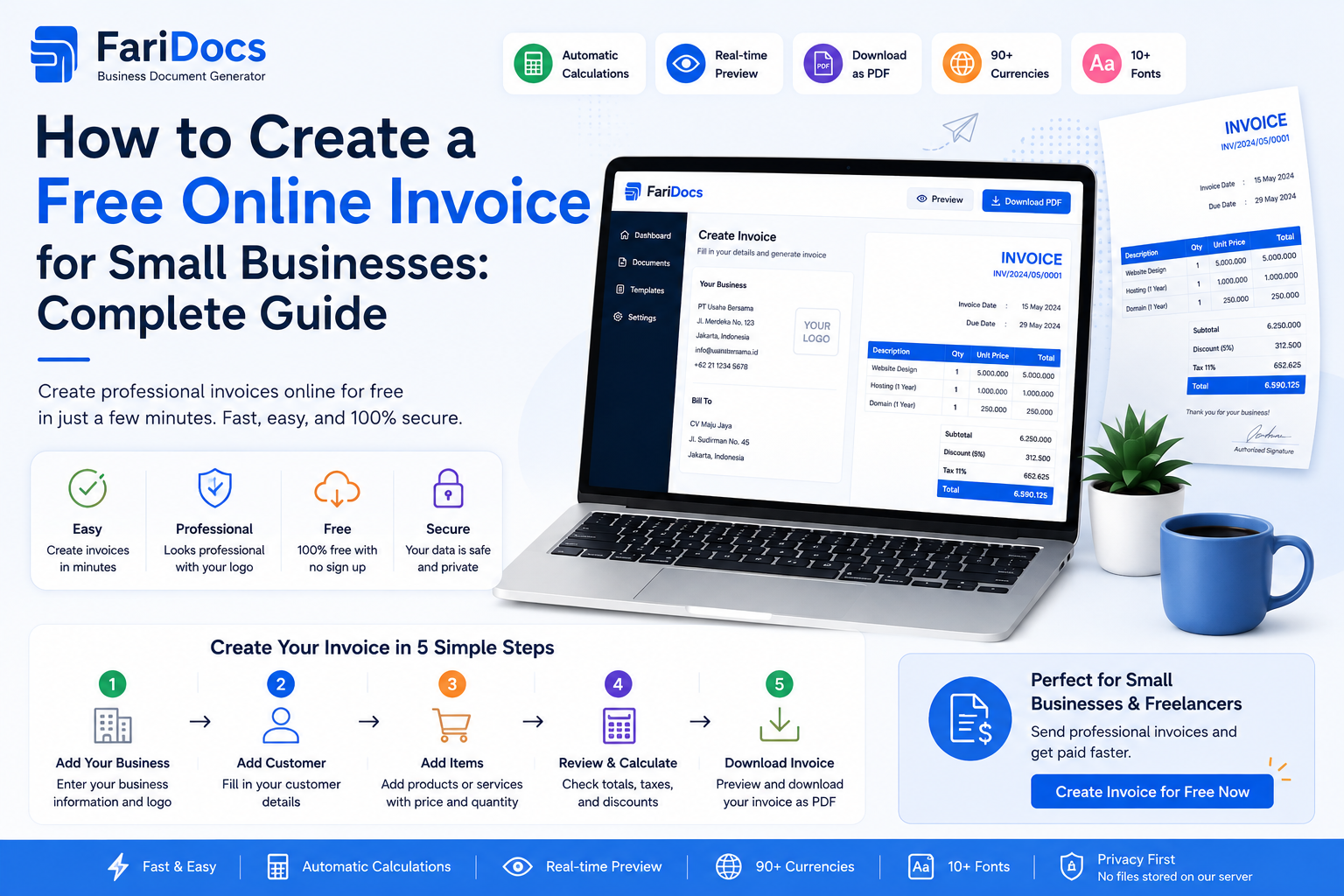
How to Create a Free Online Invoice
1. Choose an Online Invoice Software
Start by choosing an online invoicing application.
Look for features such as:
- Professional invoice templates
- Automatic invoice numbering
- Customer database
- Product and service database
- Automatic calculations
- PDF export
- Invoice history
- Digital invoice delivery
- Secure data storage
- Online access
For small businesses, invoicing software can significantly reduce repetitive administrative work.
2. Add Your Business Information
Enter your business information into the invoicing system.
This may include:
- Business name
- Business logo
- Business address
- Phone number
- Email address
- Website
- Tax information when required
- Payment account information
These details will appear on your invoices and make it clear who issued the invoice.
3. Add Customer Information
Enter the customer's details.
For example:
Customer:
ABC Trading Ltd.
100 Business Street
Singapore
finance@abctrading.com
If your invoicing software saves customer information, you can reuse the customer profile for future invoices instead of entering the same information repeatedly.
4. Create a Unique Invoice Number
Every invoice should have a unique invoice number.
Examples:
INV-2026-0001
or
INV-2026-08-001
A consistent numbering system makes it easier to track invoices, payments, and business records.
Automatic invoice numbering can also reduce the risk of duplicate invoice numbers.
5. Add Products or Services
Add the products or services being billed.
Example:
DescriptionQtyUnit PriceAmountWebsite Development1$1,500$1,500Website Maintenance2$150$300Hosting1$100$100Subtotal: $1,900
If applicable, add discounts and taxes before calculating the final total.
6. Set the Payment Due Date
A professional invoice should clearly state when payment is due.
For example:
Payment Due: September 22, 2026
Common payment terms include:
- Due on Receipt
- Net 7
- Net 15
- Net 30
- Net 60
For example, Net 30 generally means payment is due within 30 days according to the agreed payment terms.
7. Add Payment Information
Make it easy for your customer to pay.
For example:
Bank Transfer
Bank: ABC Bank
Account Name: Example Digital Ltd.
Account Number: 1234567890
You can also include other payment methods such as payment gateways or digital payment options if your business supports them.
8. Review the Invoice
Before sending an invoice, check all information carefully.
Make sure:
- Customer name is correct
- Invoice number is correct
- Invoice date is correct
- Products or services are correct
- Quantity is correct
- Pricing is correct
- Discounts are correct
- Taxes are correct
- Total amount is correct
- Due date is correct
- Payment details are correct
A small mistake can lead to payment delays or require an invoice to be corrected and reissued.
9. Send the Invoice
Once the invoice is complete, send it to your customer.
You can send invoices through:
- Customer portal
- Invoice link
- Business applications
PDF is a common format because it preserves the invoice layout across different devices.
Free Online Invoice Example
Here is a simple example of a small business invoice:
INVOICE
Invoice Number: INV-2026-0001
Invoice Date: August 23, 2026
Due Date: September 22, 2026
From:
Example Digital Ltd.
Jakarta, Indonesia
hello@exampledigital.com
Bill To:
ABC Trading Ltd.
Singapore
finance@abctrading.com
Subtotal: $1,800
Tax: $180
Total: $1,980
Payment Method: Bank Transfer
Notes: Thank you for your business.
This format can be adapted for freelancers, agencies, consultants, retailers, service businesses, and other small businesses.
What Should an Invoice Include?
A professional invoice should provide enough information for the customer to understand the transaction.
Seller Information
Include the business name, address, contact information, and other relevant business details.
Customer Information
Include the customer's name, company name, billing address, and contact information when applicable.
Invoice Number
Use a unique invoice number for every invoice.
Invoice Date
The date when the invoice was issued.
Product or Service Description
Clearly describe what the customer is being charged for.
Price and Quantity
Include the quantity, unit price, and line total.
Total Amount
Show subtotal, discounts, taxes, and final amount due.
Payment Terms
Clearly state when payment is due.
Payment Method
Provide bank details or other available payment methods.
Manual Invoice vs Online Invoice
Manual InvoiceOnline InvoiceCreated individuallyFaster to createCustomer information is often retypedCustomer data can be savedCalculations may be manualCalculations can be automatedInvoice numbers may be entered manuallyInvoice numbering can be automatedDifficult to find old invoicesInvoice history can be searchedUsually sent manuallyCan be sent digitallyHarder to manage as transactions growEasier to scaleFor small businesses with increasing transaction volumes, online invoicing can make financial administration much more efficient.
Benefits of Online Invoicing for Small Businesses
Save Time
You do not need to create the invoice layout from scratch for every transaction.
Reduce Errors
Automated calculations can reduce mistakes in totals, discounts, and taxes.
Look More Professional
Consistent invoice designs create a more professional customer experience.
Keep Records Organized
Digital invoices can be searched and organized by customer, date, or invoice number.
Send Invoices Faster
Invoices can be sent electronically without printing or physically mailing documents.
Support Business Growth
As the number of customers and transactions increases, an organized invoicing system becomes increasingly valuable.
How to Create an Online Invoice with Faridocs
Faridocs helps small businesses create and manage invoices digitally.
Instead of repeatedly entering the same customer and product information, businesses can use stored data to speed up invoice creation.
Online Invoice Workflow
Customer → Invoice → Product/Service → Payment Terms → Review → Send
The general process is:
- Select a customer.
- Add products or services.
- Enter quantity and pricing.
- Set the invoice date.
- Set the payment due date.
- Add discounts or taxes when applicable.
- Review the invoice total.
- Save the invoice.
- Download or send the invoice.
This workflow helps small businesses reduce repetitive administrative work.
Tips for Creating Professional Invoices
Use Consistent Invoice Numbers
Create a numbering system that is easy to understand and search.
Use Clear Product Descriptions
Avoid vague descriptions such as "Service" or "Product." Describe exactly what the customer is paying for.
Include a Due Date
A clear due date helps customers understand when payment is expected.
Keep the Design Simple
A professional invoice should be clean, readable, and easy to understand.
Keep Invoice Records
Store both unpaid and paid invoices. Historical invoices are important for financial records and business administration.
Use Invoicing Software
As your business grows, invoicing software can help automate repetitive tasks and organize your billing process.
Are Online Invoices Official Documents?
An online invoice is a digital form of an invoice. Whether additional requirements apply depends on the type of transaction, tax rules, and regulations in the relevant country.
Businesses should make sure their invoices comply with applicable accounting, tax, and legal requirements.
Are Free Online Invoice Tools Safe?
Security depends on the invoicing platform you choose.
Before using a free online invoice service, consider:
- How customer data is stored
- Account security
- Backup options
- User access controls
- Data export options
- Invoice history
- Activity tracking
- Document access
Do not choose an invoicing platform based solely on price. Consider security, reliability, usability, and scalability as well.
Frequently Asked Questions About Free Online Invoices
What is a free online invoice?
A free online invoice is a digital invoice created using an online invoicing tool or software that offers invoice creation at no cost within its available plan or limits.
How do I create a free online invoice?
Choose an online invoice tool, enter your business and customer information, add products or services, set prices and payment terms, review the invoice, and send it to your customer.
Do small businesses need invoices?
Yes. Invoices help small businesses document sales, communicate payment details, and request payment from customers.
Can I create an invoice from my phone?
Yes. If your invoicing application supports mobile devices or cloud access, you can create invoices using a smartphone.
Can an online invoice be downloaded as a PDF?
Yes. Many online invoicing systems allow invoices to be downloaded or exported as PDF files.
Is a free online invoice suitable for small businesses?
Yes. Online invoicing is useful for freelancers, small businesses, agencies, consultants, retailers, service providers, and other growing businesses.
What is the difference between an invoice and a receipt?
An invoice is generally a request for payment, while a receipt is generally evidence that payment has already been received.
Conclusion
Learning how to create a free online invoice is simple. Choose an online invoicing application, enter your business and customer information, add products or services, set pricing and payment terms, review the details, and send the invoice.
For small businesses, online invoicing can save time, reduce manual errors, improve organization, and create a more professional billing experience.
With Faridocs, create professional invoices faster and manage your business documents in one digital system.
Start simplifying your invoicing process with Faridocs.